<?xml version="1.0" encoding="utf-8"?><feed xmlns="http://www.w3.org/2005/Atom" ><generator uri="https://jekyllrb.com/" version="4.3.4">Jekyll</generator><link href="https://www.artur-rodrigues.com/feed.xml" rel="self" type="application/atom+xml" /><link href="https://www.artur-rodrigues.com/" rel="alternate" type="text/html" /><updated>2024-12-31T09:52:54+00:00</updated><id>https://www.artur-rodrigues.com/feed.xml</id><title type="html">artur-rodrigues.com</title><subtitle>Personal Blog | software engineering, datavis, money and food</subtitle><entry><title type="html">Kube Scheduler Metrics in Kind Clusters</title><link href="https://www.artur-rodrigues.com/tech/2024/04/07/kube-scheduler-metrics-on-kind.html" rel="alternate" type="text/html" title="Kube Scheduler Metrics in Kind Clusters" /><published>2024-04-07T12:00:00+00:00</published><updated>2024-04-07T12:00:00+00:00</updated><id>https://www.artur-rodrigues.com/tech/2024/04/07/kube-scheduler-metrics-on-kind</id><content type="html" xml:base="https://www.artur-rodrigues.com/tech/2024/04/07/kube-scheduler-metrics-on-kind.html"><![CDATA[<h2 id="context">Context</h2>

<p>While experimenting with  <code class="language-plaintext highlighter-rouge">kube-scheduler</code> on a local Kind cluster, I was interested in <a href="https://github.com/kubernetes/kubernetes/blob/9791f0d1f39f3f1e0796add7833c1059325d5098/pkg/scheduler/metrics/metrics.go">its metrics</a>. Unfortunately, they were not readily available. There were two issues:</p>

<ol>
  <li>Kind (and the underlying Kubeadm) default configuration binds the scheduler metrics server only to the loopback interface. Furthermore, it does not configure a <code class="language-plaintext highlighter-rouge">Service</code> for accessing the metrics.</li>
  <li>RBAC is enabled by default, therefore we need to configure a <code class="language-plaintext highlighter-rouge">ClusterRole</code> that <a href="https://kubernetes.io/docs/concepts/cluster-administration/system-metrics/#metrics-in-kubernetes">allows our workloads to access the control plane metrics</a>.</li>
</ol>

<p>Both issues can be observed by the fact that, out of the box, we are forced to port-forward to <code class="language-plaintext highlighter-rouge">kube-scheduler</code> in order to make HTTP requests, but even then, we still fail to fetch the metrics:</p>

<div class="language-plaintext highlighter-rouge"><div class="highlight"><pre class="highlight"><code>$ kubectl -n kube-system port-forward pod/kube-scheduler 10259:10259
Forwarding from 127.0.0.1:10259 -&gt; 10259
Forwarding from [::1]:10259 -&gt; 10259
</code></pre></div></div>

<div class="language-plaintext highlighter-rouge"><div class="highlight"><pre class="highlight"><code>$ curl -k https://localhost:10259/metrics
{
  "kind": "Status",
  "apiVersion": "v1",
  "metadata": {},
  "status": "Failure",
  "message": "forbidden: User \"system:anonymous\" cannot get path \"/metrics\"",
  "reason": "Forbidden",
  "details": {},
  "code": 403
}
</code></pre></div></div>

<h2 id="solution">Solution</h2>

<p>First, we need to set the <code class="language-plaintext highlighter-rouge">--bind-address</code> command line argument for <code class="language-plaintext highlighter-rouge">kube-scheduler</code> to <code class="language-plaintext highlighter-rouge">0.0.0.0</code>. This can be done by creating a custom Kind config:</p>

<div class="language-yaml highlighter-rouge"><div class="highlight"><pre class="highlight"><code><span class="na">kind</span><span class="pi">:</span> <span class="s">Cluster</span>
<span class="na">apiVersion</span><span class="pi">:</span> <span class="s">kind.x-k8s.io/v1alpha4</span>
<span class="na">name</span><span class="pi">:</span> <span class="s">my-cluster</span>
<span class="na">nodes</span><span class="pi">:</span>
  <span class="pi">-</span> <span class="na">role</span><span class="pi">:</span> <span class="s">control-plane</span>
    <span class="na">kubeadmConfigPatches</span><span class="pi">:</span>
      <span class="pi">-</span> <span class="pi">|</span>
        <span class="s">kind: ClusterConfiguration</span>
        <span class="s">scheduler:</span>
          <span class="s">extraArgs:</span>
            <span class="s">bind-address: "0.0.0.0"</span>
  <span class="pi">-</span> <span class="na">role</span><span class="pi">:</span> <span class="s">worker</span>
</code></pre></div></div>

<p>We can launch a new Kind cluster with <code class="language-plaintext highlighter-rouge">kind create cluster --config /path/to/kind-cluster.yaml</code>. We can verify that it worked by checking the Pod spec for <code class="language-plaintext highlighter-rouge">kube-scheduler</code>:</p>

<div class="language-plaintext highlighter-rouge"><div class="highlight"><pre class="highlight"><code>$ kubectl -n kube-system get pod kube-scheduler-my-cluster-control-plane -o yaml | grep command -A5
  - command:
    - kube-scheduler
    - --authentication-kubeconfig=/etc/kubernetes/scheduler.conf
    - --authorization-kubeconfig=/etc/kubernetes/scheduler.conf
    - --bind-address=0.0.0.0
    - --kubeconfig=/etc/kubernetes/scheduler.conf
</code></pre></div></div>

<p>Then we will need to configure a <code class="language-plaintext highlighter-rouge">Service</code> for the <code class="language-plaintext highlighter-rouge">kube-scheduler</code> metrics, as well as a <code class="language-plaintext highlighter-rouge">ClusterRole</code> and <code class="language-plaintext highlighter-rouge">ClusterRoleBinding</code> to access them.</p>

<p>To make use of the metrics in a productive manner, it is desirable to have an observability stack deployed in the cluster, which automatically scraps the metrics endpoint. Luckily, VictoriaMetrics has a handy Helm chart called <a href="https://github.com/VictoriaMetrics/helm-charts/blob/master/charts/victoria-metrics-k8s-stack/"><code class="language-plaintext highlighter-rouge">victoria-metrics-k8s-stack</code></a> that ships with both the <code class="language-plaintext highlighter-rouge">Service</code> and the RBAC configuration, as well as the scraping rules for the metrics and Grafana:</p>

<ul>
  <li><a href="https://github.com/VictoriaMetrics/helm-charts/blob/624f078a10be80669b0e48238ecd9bd5d049bd5a/charts/victoria-metrics-k8s-stack/templates/servicemonitors/kube-scheduler.yaml#L26-L51"><code class="language-plaintext highlighter-rouge">Service</code> definition</a></li>
  <li><a href="https://github.com/VictoriaMetrics/helm-charts/blob/624f078a10be80669b0e48238ecd9bd5d049bd5a/charts/victoria-metrics-agent/templates/clusterrole.yaml#L41-L42"><code class="language-plaintext highlighter-rouge">ClusterRole</code> and <code class="language-plaintext highlighter-rouge">ClusterRoleBinding</code> definition</a></li>
  <li><a href="https://github.com/VictoriaMetrics/helm-charts/blob/624f078a10be80669b0e48238ecd9bd5d049bd5a/charts/victoria-metrics-k8s-stack/templates/servicemonitors/kube-scheduler.yaml#L53-L67"><code class="language-plaintext highlighter-rouge">VMServiceScrape</code></a></li>
</ul>

<p>Since this is a test Kind cluster, we can opt for the <code class="language-plaintext highlighter-rouge">vmsingle</code> flavour - the default for the chart. After installing it, we can enter the <code class="language-plaintext highlighter-rouge">vmagent</code> pod and see what is available on the <code class="language-plaintext highlighter-rouge">/metrics</code> endpoint of <code class="language-plaintext highlighter-rouge">kube-scheduler</code>, using the service account credentials and passing the <code class="language-plaintext highlighter-rouge">--insecure</code> option (since the certificate bundle for Kind clusters is self-signed):</p>

<div class="language-plaintext highlighter-rouge"><div class="highlight"><pre class="highlight"><code>$ kubectl -n vm exec -it vmagent-vm-victoria-metrics-k8s-stack-68898f7ff5-npkwn -c vmagent -- sh
/ # curl -s -k --header "Authorization: Bearer $(cat /var/run/secrets/kubernetes.io/serviceaccount/token)" https://vm-victoria-metrics-k8s-stack-kube-scheduler.kube-system:10259/metrics |
grep 'queue_incoming_pods_total'
# HELP scheduler_queue_incoming_pods_total [STABLE] Number of pods added to scheduling queues by event and queue type.
# TYPE scheduler_queue_incoming_pods_total counter
scheduler_queue_incoming_pods_total{event="NodeTaintChange",queue="active"} 3
scheduler_queue_incoming_pods_total{event="PodAdd",queue="active"} 16
scheduler_queue_incoming_pods_total{event="ScheduleAttemptFailure",queue="unschedulable"} 3
</code></pre></div></div>

<p>Similarly, <code class="language-plaintext highlighter-rouge">vmagent</code> must be configured to skip certificate verification when scraping <code class="language-plaintext highlighter-rouge">kube-scheduler</code> while also overriding the server’s name. This can be done through <a href="https://helm.sh/docs/chart_template_guide/values_files/">Helm Values files</a>. Here is my final overridden values file:</p>

<div class="language-yaml highlighter-rouge"><div class="highlight"><pre class="highlight"><code><span class="na">kubeScheduler</span><span class="pi">:</span>
  <span class="na">enabled</span><span class="pi">:</span> <span class="kc">true</span>
  <span class="na">endpoints</span><span class="pi">:</span> <span class="pi">[]</span>
  <span class="na">service</span><span class="pi">:</span>
    <span class="na">enabled</span><span class="pi">:</span> <span class="kc">true</span>
    <span class="na">port</span><span class="pi">:</span> <span class="m">10259</span>
    <span class="na">targetPort</span><span class="pi">:</span> <span class="m">10259</span>
  <span class="na">spec</span><span class="pi">:</span>
    <span class="na">jobLabel</span><span class="pi">:</span> <span class="s">jobLabel</span>
    <span class="na">endpoints</span><span class="pi">:</span>
      <span class="pi">-</span> <span class="na">bearerTokenFile</span><span class="pi">:</span> <span class="s">/var/run/secrets/kubernetes.io/serviceaccount/token</span>
        <span class="na">port</span><span class="pi">:</span> <span class="s">http-metrics</span>
        <span class="na">scheme</span><span class="pi">:</span> <span class="s">https</span>
        <span class="na">tlsConfig</span><span class="pi">:</span>
          <span class="na">caFile</span><span class="pi">:</span> <span class="s">/var/run/secrets/kubernetes.io/serviceaccount/ca.crt</span>
          <span class="na">insecureSkipVerify</span><span class="pi">:</span> <span class="kc">true</span>
          <span class="na">serverName</span><span class="pi">:</span> <span class="s2">"</span><span class="s">127.0.0.1"</span>
</code></pre></div></div>

<p>With this configuration in place, we can verify that metrics are being scraped by <code class="language-plaintext highlighter-rouge">vmagent</code>:</p>

<div class="language-plaintext highlighter-rouge"><div class="highlight"><pre class="highlight"><code>$ kubectl -n vm port-forward svc/vmsingle-vm-victoria-metrics-k8s-stack 8429:8429
Forwarding from 127.0.0.1:8429 -&gt; 8429
Forwarding from [::1]:8429 -&gt; 8429
</code></pre></div></div>

<div class="language-plaintext highlighter-rouge"><div class="highlight"><pre class="highlight"><code>$ curl -s localhost:8429/prometheus/api/v1/query \
  -d 'query=scheduler_queue_incoming_pods_total' |\
  jq '.data.result[] | .metric.__name__, .metric.event, .value'
"scheduler_queue_incoming_pods_total"
"NodeTaintChange"
[
  1712516523,
  "3"
]
"scheduler_queue_incoming_pods_total"
"PodAdd"
[
  1712516523,
  "16"
]
"scheduler_queue_incoming_pods_total"
"ScheduleAttemptFailure"
[
  1712516523,
  "3"
]
</code></pre></div></div>

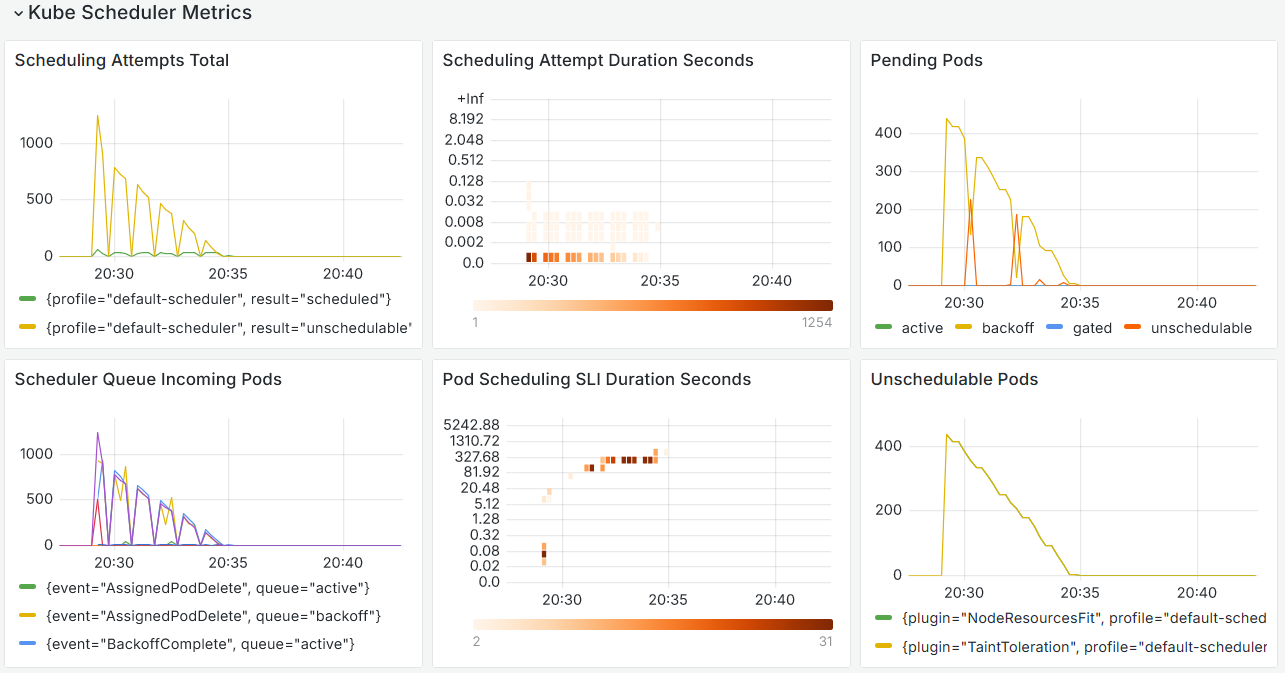
<p>And start building dashboards for our experiments:</p>

<p><img src="/img/kube-scheduler-dashboard.png" alt="kube-scheduler-dashboard" /></p>]]></content><author><name></name></author><category term="tech" /><category term="kubernetes" /><summary type="html"><![CDATA[Context]]></summary></entry><entry><title type="html">Cross-Cloud Access: A Native Kubernetes OIDC Approach</title><link href="https://www.artur-rodrigues.com/tech/2024/03/19/cross-cloud-access-a-native-kubernetes-oidc-approach.html" rel="alternate" type="text/html" title="Cross-Cloud Access: A Native Kubernetes OIDC Approach" /><published>2024-03-19T12:00:00+00:00</published><updated>2024-03-19T12:00:00+00:00</updated><id>https://www.artur-rodrigues.com/tech/2024/03/19/cross-cloud-access-a-native-kubernetes-oidc-approach</id><content type="html" xml:base="https://www.artur-rodrigues.com/tech/2024/03/19/cross-cloud-access-a-native-kubernetes-oidc-approach.html"><![CDATA[<p><em>Written in collaboration with <a href="https://github.com/ckav370">Chloe Blain</a></em></p>

<h2 id="goal">Goal</h2>

<p>Setup a minimal working example where pods in GKE and EKS can access two buckets, one in S3 and another in GCS with no static credentials or runtime configuration. In other words, running the below commands should just work from within a pod in both clusters:</p>

<div class="language-plaintext highlighter-rouge"><div class="highlight"><pre class="highlight"><code>$ aws s3 ls s3://oidc-exp-s3-bucket
</code></pre></div></div>

<div class="language-plaintext highlighter-rouge"><div class="highlight"><pre class="highlight"><code>$ gcloud storage ls gs://oidc-exp-gcs-bucket
</code></pre></div></div>

<h2 id="context">Context</h2>

<p>Communicating with Cloud APIs without the use of static, long-lived credentials from within Kubernetes requires some work even when using the CSP’s managed Kubernetes versions. In AWS, this is done through <a href="https://docs.aws.amazon.com/eks/latest/userguide/pod-identities.html">EKS Pod Identities</a>, or <a href="https://docs.aws.amazon.com/eks/latest/userguide/iam-roles-for-service-accounts.html">IAM Roles for Service Accounts</a> (IRSA), while in GCP this is achieved through <a href="https://cloud.google.com/kubernetes-engine/docs/concepts/workload-identity">Workload Identity Federation (WIF) for GKE</a>.</p>

<p>Both IRSA and Workload Identity Federation leverage OpenID Connect (OIDC) with Kubernetes configured as an Identity Provider on both clouds’ IAM to assume roles (AWS) and impersonate service accounts (GCP). The two processes are well documented online.</p>

<p>However, when a Kubernetes workload running in one CSP needs to access services in another CSP, the configuration might not be as straightforward and potentially have more than way of achieving the desired result.</p>

<p>In particular, the path from GKE to AWS APIs is not as well documented when trying to use Kubernetes itself as the Identity Provider to AWS IAM. Both AWS’s <a href="https://aws.amazon.com/blogs/security/access-aws-using-a-google-cloud-platform-native-workload-identity/">recent blog post on the topic</a> and the <a href="https://github.com/doitintl/gtoken">doitintl/gtoken project</a> rely on Google (not Kubernetes) being the Identity Provider and the execution of some pre-steps or configuration of Mutating Webhooks to get workloads to “just work”.</p>

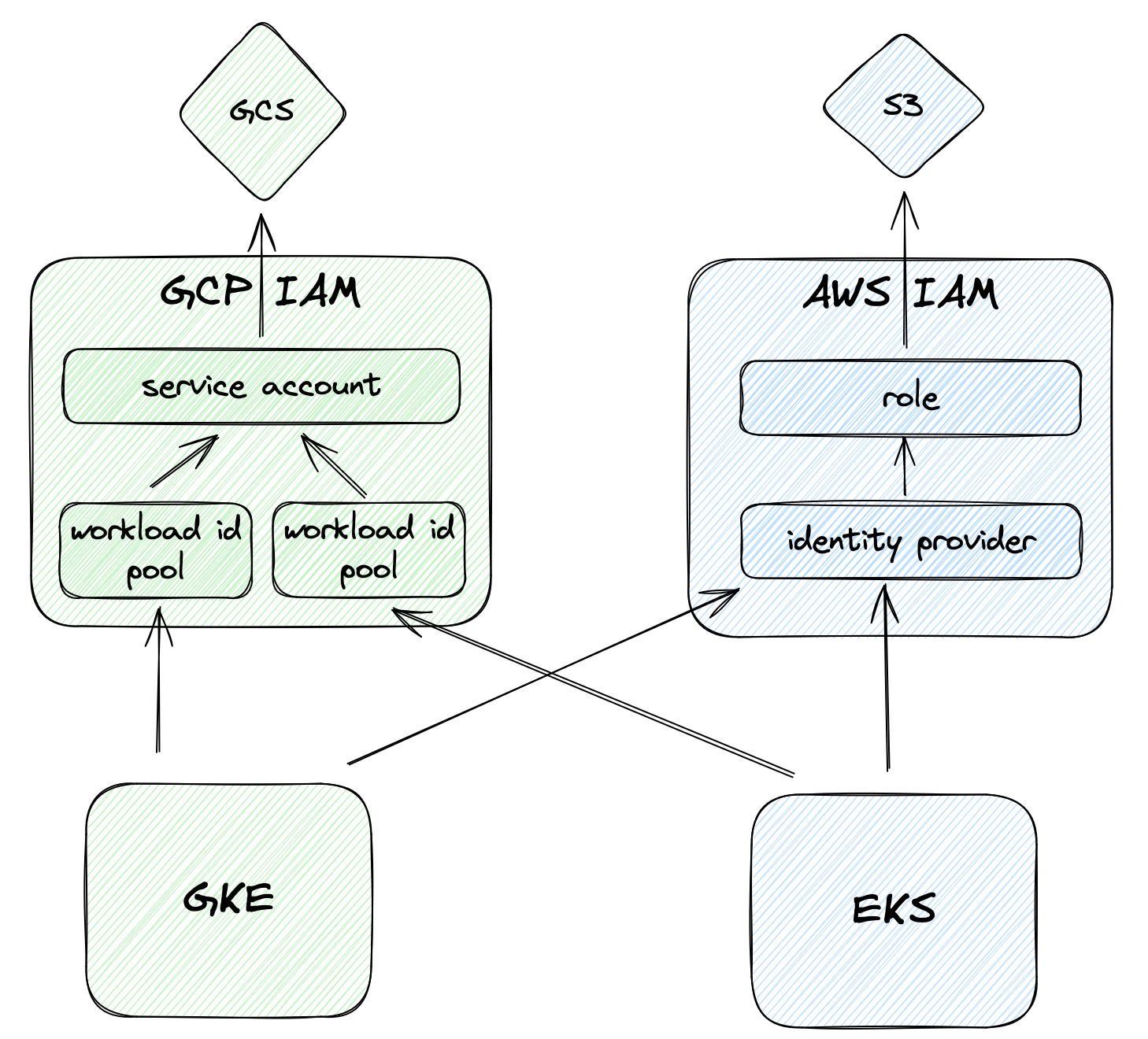
<p>However, it is possible to achieve keyless cross-cloud access using Kubernetes OIDC as the Identity Provider for both EKS and GKE. While there’s a good amount of pre-configuration involved, the result is very flexible and fully native. This post will demonstrate how to do so.</p>

<p><img src="/img/xcloud-access.png" alt="cross-cloud-access-1" width="450px" /></p>

<p>If you’re unfamiliar with the OIDC Authentication flow, here’s one way to think about it in simple terms:</p>

<ol>
  <li>The Cluster Administrator configures the Kubernetes Cluster and its access is secure and controlled.</li>
  <li>Kubernetes provides ServiceAccounts with an identity token that has been signed with a private key.</li>
  <li>The Cluster Administrator reviews the Pod and ServiceAccount creations and modifications or trusts others to do so.</li>
  <li>CSPs can be configured to accept IAM requests that come from clusters, by verifying their signature and identity - this is possible because they’ve been previously configured with the public key of the cluster.</li>
  <li>Pods use the ServiceAccount token to authenticate with the CSP IAM and exchange them for short lived credentials that have access to other APIs.</li>
</ol>

<h2 id="real-world-example">Real World Example</h2>

<p>A fully working IaC example is available on <a href="https://github.com/arturhoo/oidc-exp/">https://github.com/arturhoo/oidc-exp/</a> - below the main points are demonstrated. The examples start from the in-cloud access and then move to cross-cloud access.</p>

<p>For this exercise, two buckets will be created with a text file, one on each CSP.</p>

<div class="language-hcl highlighter-rouge"><div class="highlight"><pre class="highlight"><code><span class="nx">resource</span> <span class="s2">"aws_s3_bucket"</span> <span class="s2">"s3_bucket"</span> <span class="p">{</span>
  <span class="nx">bucket</span> <span class="o">=</span> <span class="nx">var</span><span class="p">.</span><span class="nx">s3_bucket</span>
<span class="p">}</span>

<span class="nx">resource</span> <span class="s2">"aws_s3_object"</span> <span class="s2">"s3_object"</span> <span class="p">{</span>
  <span class="nx">bucket</span>  <span class="o">=</span> <span class="nx">aws_s3_bucket</span><span class="p">.</span><span class="nx">s3_bucket</span><span class="p">.</span><span class="nx">id</span>
  <span class="nx">key</span> 	<span class="o">=</span> <span class="s2">"test.txt"</span>
  <span class="nx">content</span> <span class="o">=</span> <span class="s2">"Hello, from S3!"</span>
<span class="p">}</span>

<span class="nx">resource</span> <span class="s2">"google_storage_bucket"</span> <span class="s2">"gcs_bucket"</span> <span class="p">{</span>
  <span class="nx">name</span> 	<span class="o">=</span> <span class="nx">var</span><span class="p">.</span><span class="nx">gcs_bucket</span>
  <span class="nx">location</span> <span class="o">=</span> <span class="nx">var</span><span class="p">.</span><span class="nx">gcp_region</span>
<span class="p">}</span>

<span class="nx">resource</span> <span class="s2">"google_storage_bucket_object"</span> <span class="s2">"gcs_object"</span> <span class="p">{</span>
  <span class="nx">bucket</span>  <span class="o">=</span> <span class="nx">google_storage_bucket</span><span class="p">.</span><span class="nx">gcs_bucket</span><span class="p">.</span><span class="nx">name</span>
  <span class="nx">name</span>	<span class="o">=</span> <span class="s2">"test.txt"</span>
  <span class="nx">content</span> <span class="o">=</span> <span class="s2">"Hello, from GCS!"</span>
<span class="p">}</span>
</code></pre></div></div>

<h3 id="eks-to-aws">EKS to AWS</h3>

<p>To access AWS APIs from workloads in EKS there are primarily two options: <a href="https://docs.aws.amazon.com/eks/latest/userguide/pod-identities.html">EKS Pod Identities</a>, or <a href="https://docs.aws.amazon.com/eks/latest/userguide/iam-roles-for-service-accounts.html">IAM Roles for Service Accounts</a> (IRSA). Here the focus is on IRSA since the exercise focuses on Kubernetes OIDC.</p>

<p>All EKS clusters (including those with only private subnets and private endpoints) have a publicly available OIDC discovery endpoint, that allows other parties to verify the signature of potential JWT tokens (exposed in the URL under <code class="language-plaintext highlighter-rouge">jwks_uri</code>) that have been allegedly signed by the cluster.</p>

<div class="language-plaintext highlighter-rouge"><div class="highlight"><pre class="highlight"><code>$ xh https://oidc.eks.eu-west-2.amazonaws.com/id/4E604436464FFCC52F8B96807F5BD5BC/.well-known/openid-configuration
{
    "issuer": "https://oidc.eks.eu-west-2.amazonaws.com/id/4E604436464FFCC52F8B96807F5BD5BC",
    "jwks_uri": "https://oidc.eks.eu-west-2.amazonaws.com/id/4E604436464FFCC52F8B96807F5BD5BC/keys",
    "authorization_endpoint": "urn:kubernetes:programmatic_authorization",
    "response_types_supported": [
        "id_token"
    ],
    "subject_types_supported": [
        "public"
    ],
    "claims_supported": [
        "sub",
        "iss"
    ],
    "id_token_signing_alg_values_supported": [
        "RS256"
    ]
}
</code></pre></div></div>

<p>The first step is configuring the EKS cluster to be an Identity Provider in AWS IAM:</p>

<div class="language-hcl highlighter-rouge"><div class="highlight"><pre class="highlight"><code><span class="nx">data</span> <span class="s2">"tls_certificate"</span> <span class="s2">"cert"</span> <span class="p">{</span>
  <span class="nx">url</span> <span class="o">=</span> <span class="nx">aws_eks_cluster</span><span class="p">.</span><span class="nx">primary</span><span class="p">.</span><span class="nx">identity</span><span class="p">[</span><span class="mi">0</span><span class="p">].</span><span class="nx">oidc</span><span class="p">[</span><span class="mi">0</span><span class="p">].</span><span class="nx">issuer</span>
<span class="p">}</span>

<span class="nx">resource</span> <span class="s2">"aws_iam_openid_connect_provider"</span> <span class="s2">"oidc_provider"</span> <span class="p">{</span>
  <span class="nx">client_id_list</span>  <span class="o">=</span> <span class="p">[</span><span class="s2">"sts.amazonaws.com"</span><span class="p">]</span>
  <span class="nx">thumbprint_list</span> <span class="o">=</span> <span class="p">[</span><span class="nx">data</span><span class="p">.</span><span class="nx">tls_certificate</span><span class="p">.</span><span class="nx">cert</span><span class="p">.</span><span class="nx">certificates</span><span class="p">[</span><span class="mi">0</span><span class="p">].</span><span class="nx">sha1_fingerprint</span><span class="p">]</span>
  <span class="nx">url</span>             <span class="o">=</span> <span class="nx">aws_eks_cluster</span><span class="p">.</span><span class="nx">primary</span><span class="p">.</span><span class="nx">identity</span><span class="p">[</span><span class="mi">0</span><span class="p">].</span><span class="nx">oidc</span><span class="p">[</span><span class="mi">0</span><span class="p">].</span><span class="nx">issuer</span>
<span class="p">}</span>
</code></pre></div></div>

<p>Then, a role that can read from S3 must be created. This role will have an <code class="language-plaintext highlighter-rouge">AssumeRole</code> policy that uses the previously configured EKS cluster as a federated identity provider. To make it more restrictive, we define a condition on the <code class="language-plaintext highlighter-rouge">sub</code> claim of the JWT token signed by the cluster to match the namespace and service account the workload itself will use.</p>

<div class="language-hcl highlighter-rouge"><div class="highlight"><pre class="highlight"><code><span class="nx">resource</span> <span class="s2">"aws_iam_role"</span> <span class="s2">"federated_role"</span> <span class="p">{</span>
  <span class="nx">name</span> <span class="o">=</span> <span class="s2">"oidc_exp_federated_role"</span>

  <span class="nx">assume_role_policy</span> <span class="o">=</span> <span class="nx">jsonencode</span><span class="p">({</span>
    <span class="nx">Version</span> <span class="o">=</span> <span class="s2">"2012-10-17"</span>
    <span class="nx">Statement</span> <span class="o">=</span> <span class="p">[</span>
      <span class="p">{</span>
        <span class="s2">"Effect"</span> <span class="o">:</span> <span class="s2">"Allow"</span><span class="p">,</span>
        <span class="s2">"Principal"</span> <span class="o">:</span> <span class="p">{</span>
          <span class="s2">"Federated"</span> <span class="o">:</span> <span class="nx">aws_iam_openid_connect_provider</span><span class="p">.</span><span class="nx">oidc_provider</span><span class="p">.</span><span class="nx">arn</span>
        <span class="p">},</span>
        <span class="s2">"Action"</span> <span class="o">:</span> <span class="s2">"sts:AssumeRoleWithWebIdentity"</span><span class="p">,</span>
        <span class="s2">"Condition"</span> <span class="o">:</span> <span class="p">{</span>
          <span class="s2">"StringEquals"</span> <span class="o">:</span> <span class="p">{</span>
            <span class="s2">"${local.eks_issuer}:aud"</span> <span class="o">:</span> <span class="s2">"sts.amazonaws.com"</span><span class="p">,</span>
            <span class="s2">"${local.eks_issuer}:sub"</span> <span class="o">:</span> <span class="s2">"system:serviceaccount:default:oidc-exp-service-account"</span>
          <span class="p">}</span>
        <span class="p">}</span>
      <span class="p">}</span>
    <span class="p">]</span>
  <span class="p">})</span>
<span class="p">}</span>

<span class="nx">resource</span> <span class="s2">"aws_iam_policy"</span> <span class="s2">"s3_read_policy"</span> <span class="p">{</span>
  <span class="nx">name</span> <span class="o">=</span> <span class="s2">"s3_read_policy"</span>

  <span class="nx">policy</span> <span class="o">=</span> <span class="nx">jsonencode</span><span class="p">({</span>
    <span class="nx">Version</span> <span class="o">=</span> <span class="s2">"2012-10-17"</span><span class="p">,</span>
    <span class="nx">Statement</span> <span class="o">=</span> <span class="p">[</span>
      <span class="p">{</span>
        <span class="nx">Effect</span> <span class="o">=</span> <span class="s2">"Allow"</span><span class="p">,</span>
        <span class="nx">Action</span> <span class="o">=</span> <span class="p">[</span><span class="s2">"s3:GetObject"</span><span class="p">,</span> <span class="s2">"s3:GetObjectVersion"</span><span class="p">,</span> <span class="s2">"s3:ListBucket"</span><span class="p">],</span>
        <span class="nx">Resource</span> <span class="o">=</span> <span class="p">[</span>
          <span class="s2">"arn:aws:s3:::${var.s3_bucket}"</span><span class="p">,</span>
          <span class="s2">"arn:aws:s3:::${var.s3_bucket}/*"</span><span class="p">,</span>
        <span class="p">],</span>
      <span class="p">},</span>
    <span class="p">],</span>
  <span class="p">})</span>
<span class="p">}</span>

<span class="nx">resource</span> <span class="s2">"aws_iam_role_policy_attachment"</span> <span class="s2">"s3_read_policy_attachment"</span> <span class="p">{</span>
  <span class="nx">role</span>       <span class="o">=</span> <span class="nx">aws_iam_role</span><span class="p">.</span><span class="nx">federated_role</span><span class="p">.</span><span class="nx">name</span>
  <span class="nx">policy_arn</span> <span class="o">=</span> <span class="nx">aws_iam_policy</span><span class="p">.</span><span class="nx">s3_read_policy</span><span class="p">.</span><span class="nx">arn</span>
<span class="p">}</span>
</code></pre></div></div>

<p>Finally, on EKS, a service account with a specific annotation is needed:</p>

<div class="language-yaml highlighter-rouge"><div class="highlight"><pre class="highlight"><code><span class="na">apiVersion</span><span class="pi">:</span> <span class="s">v1</span>
<span class="na">kind</span><span class="pi">:</span> <span class="s">ServiceAccount</span>
<span class="na">metadata</span><span class="pi">:</span>
  <span class="na">name</span><span class="pi">:</span> <span class="s">oidc-exp-service-account</span>
  <span class="na">namespace</span><span class="pi">:</span> <span class="s">default</span>
  <span class="na">annotations</span><span class="pi">:</span>
    <span class="na">eks.amazonaws.com/role-arn</span><span class="pi">:</span> <span class="s">arn:aws:iam::$AWS_ACCOUNT_ID:role/oidc_exp_federated_role</span>
</code></pre></div></div>

<div class="language-yaml highlighter-rouge"><div class="highlight"><pre class="highlight"><code><span class="na">apiVersion</span><span class="pi">:</span> <span class="s">v1</span>
<span class="na">kind</span><span class="pi">:</span> <span class="s">Pod</span>
<span class="na">metadata</span><span class="pi">:</span>
  <span class="na">name</span><span class="pi">:</span> <span class="s">aws-cli</span>
  <span class="na">namespace</span><span class="pi">:</span> <span class="s">default</span>
<span class="na">spec</span><span class="pi">:</span>
  <span class="na">containers</span><span class="pi">:</span>
    <span class="pi">-</span> <span class="na">name</span><span class="pi">:</span> <span class="s">aws-cli</span>
      <span class="na">image</span><span class="pi">:</span> <span class="s">amazon/aws-cli</span>
      <span class="na">command</span><span class="pi">:</span>
        <span class="pi">-</span> <span class="s">/bin/bash</span>
        <span class="pi">-</span> <span class="s">-c</span>
        <span class="pi">-</span> <span class="s2">"</span><span class="s">sleep</span><span class="nv"> </span><span class="s">1800"</span>
  <span class="na">serviceAccountName</span><span class="pi">:</span> <span class="s">oidc-exp-service-account</span>
</code></pre></div></div>

<p>Behind the scenes, EKS is using a <a href="https://github.com/aws/amazon-eks-pod-identity-webhook">Mutating Webhook Controller</a> to mount an OIDC token signed by the cluster into the pod through a <a href="https://kubernetes.io/docs/tasks/configure-pod-container/configure-service-account/#service-account-token-volume-projection">volume projection</a> and setting an environment variable for <code class="language-plaintext highlighter-rouge">AWS_WEB_IDENTITY_TOKEN_FILE</code> and <code class="language-plaintext highlighter-rouge">AWS_ROLE_ARN</code>, which in turn are used by the AWS SDK as auto configuration. We can see the modifications made to the pod there weren’t originally present in the pod definition above:</p>

<div class="language-plaintext highlighter-rouge"><div class="highlight"><pre class="highlight"><code>$ kubectl --context aws get pod aws-cli -o yaml
apiVersion: v1
kind: Pod
metadata:
  name: aws-cli
  namespace: default
  ...
spec:
    ...
    env:
    - name: AWS_STS_REGIONAL_ENDPOINTS
      value: regional
    - name: AWS_DEFAULT_REGION
      value: eu-west-2
    - name: AWS_REGION
      value: eu-west-2
    - name: AWS_ROLE_ARN
      value: arn:aws:iam::&lt;REDACTED&gt;:role/oidc_exp_federated_role
    - name: AWS_WEB_IDENTITY_TOKEN_FILE
      value: /var/run/secrets/eks.amazonaws.com/serviceaccount/token
    image: amazon/aws-cli
    ...
    name: aws-cli
    volumeMounts:
    - mountPath: /var/run/secrets/eks.amazonaws.com/serviceaccount
      name: aws-iam-token
      readOnly: true
      ...
  ...
  volumes:
  - name: aws-iam-token
    projected:
      defaultMode: 420
      sources:
      - serviceAccountToken:
          audience: sts.amazonaws.com
          expirationSeconds: 86400
          path: token
    ...
...
status:
  ...
  phase: Running
</code></pre></div></div>

<p>This allows reads from S3 without any other changes from within the pod:</p>

<div class="language-plaintext highlighter-rouge"><div class="highlight"><pre class="highlight"><code>$ kubectl --context aws exec -it gcloud-cli -- bash
bash-4.2# aws s3 ls s3://oidc-exp-s3-bucket
2024-03-17 18:29:42     	15 test.txt
</code></pre></div></div>

<p>Success! 1/4 complete.</p>

<h3 id="gke-to-gcp">GKE to GCP</h3>

<p>As previously mentioned, the golden path is through <a href="https://cloud.google.com/kubernetes-engine/docs/concepts/workload-identity">Workload Identity Federation (WIF) for GKE</a>. When Workload Identity is Enabled for a GKE cluster, an implicit Workload Identity Pool is created with the format <code class="language-plaintext highlighter-rouge">PROJECT_ID.svc.id.goog</code>, and the GKE Issuer URL configured behind the scenes.</p>

<div class="language-hcl highlighter-rouge"><div class="highlight"><pre class="highlight"><code><span class="nx">resource</span> <span class="s2">"google_container_cluster"</span> <span class="s2">"primary"</span> <span class="p">{</span>
  <span class="p">...</span>
  <span class="nx">workload_identity_config</span> <span class="p">{</span>
    <span class="nx">workload_pool</span> <span class="o">=</span> <span class="s2">"${data.google_project.project.project_id}.svc.id.goog"</span>
  <span class="p">}</span>
<span class="p">}</span>
</code></pre></div></div>

<p>We will also need a GCP IAM Service account with the correct permissions to read from the bucket:</p>

<div class="language-hcl highlighter-rouge"><div class="highlight"><pre class="highlight"><code><span class="nx">resource</span> <span class="s2">"google_service_account"</span> <span class="s2">"default"</span> <span class="p">{</span>
  <span class="nx">account_id</span>   <span class="o">=</span> <span class="s2">"oidc-exp-service-account"</span>
  <span class="nx">display_name</span> <span class="o">=</span> <span class="s2">"OIDC Exp Service Account"</span>
<span class="p">}</span>

<span class="nx">resource</span> <span class="s2">"google_storage_bucket_iam_binding"</span> <span class="s2">"viewer"</span> <span class="p">{</span>
  <span class="nx">bucket</span>  <span class="o">=</span> <span class="nx">var</span><span class="p">.</span><span class="nx">gcs_bucket</span>
  <span class="nx">role</span>    <span class="o">=</span> <span class="s2">"roles/storage.objectViewer"</span>
  <span class="nx">members</span> <span class="o">=</span> <span class="p">[</span><span class="s2">"serviceAccount:${google_service_account.default.email}"</span><span class="p">]</span>
<span class="p">}</span>
</code></pre></div></div>

<p>In Kubernetes, a Service Account must be created with a special annotation that will allow the GCP SDK to perform a <a href="https://cloud.google.com/kubernetes-engine/docs/concepts/workload-identity#credential-flow">multi-step process</a> that intercept calls to GCP APIs and exchanges a service account token generated on-demand by the cluster for a GCP access token, which is then used to access the APIs. For this reason, contrary to EKS, no service account volume projection takes place.</p>

<div class="language-yaml highlighter-rouge"><div class="highlight"><pre class="highlight"><code><span class="na">apiVersion</span><span class="pi">:</span> <span class="s">v1</span>
<span class="na">kind</span><span class="pi">:</span> <span class="s">ServiceAccount</span>
<span class="na">metadata</span><span class="pi">:</span>
  <span class="na">name</span><span class="pi">:</span> <span class="s">oidc-exp-service-account</span>
  <span class="na">namespace</span><span class="pi">:</span> <span class="s">default</span>
  <span class="na">annotations</span><span class="pi">:</span>
    <span class="na">iam.gke.io/gcp-service-account</span><span class="pi">:</span> <span class="s">oidc-exp-service-account@$GCP_PROJECT_ID.iam.gserviceaccount.com</span>
</code></pre></div></div>

<p>For the previously mentioned token exchange to take place, the GCP IAM Service Account must have the federated K8s service account configured to assume it:</p>

<div class="language-hcl highlighter-rouge"><div class="highlight"><pre class="highlight"><code><span class="nx">resource</span> <span class="s2">"google_service_account_iam_binding"</span> <span class="s2">"service_account_iam_binding"</span> <span class="p">{</span>
  <span class="nx">service_account_id</span> <span class="o">=</span> <span class="nx">google_service_account</span><span class="p">.</span><span class="nx">default</span><span class="p">.</span><span class="nx">name</span>
  <span class="nx">role</span>               <span class="o">=</span> <span class="s2">"roles/iam.workloadIdentityUser"</span>
  <span class="nx">members</span> <span class="o">=</span> <span class="p">[</span>
    <span class="s2">"serviceAccount:${var.gcp_project_id}.svc.id.goog[default/oidc-exp-service-account]"</span><span class="p">,</span>
  <span class="p">]</span>
<span class="p">}</span>
</code></pre></div></div>

<p>The pod simply uses the service account:</p>

<div class="language-yaml highlighter-rouge"><div class="highlight"><pre class="highlight"><code><span class="na">apiVersion</span><span class="pi">:</span> <span class="s">v1</span>
<span class="na">kind</span><span class="pi">:</span> <span class="s">Pod</span>
<span class="na">metadata</span><span class="pi">:</span>
  <span class="na">name</span><span class="pi">:</span> <span class="s">gcloud-cli</span>
  <span class="na">namespace</span><span class="pi">:</span> <span class="s">default</span>
<span class="na">spec</span><span class="pi">:</span>
  <span class="na">containers</span><span class="pi">:</span>
    <span class="pi">-</span> <span class="na">name</span><span class="pi">:</span> <span class="s">gcloud-cli</span>
      <span class="na">image</span><span class="pi">:</span> <span class="s">gcr.io/google.com/cloudsdktool/google-cloud-cli:alpine</span>
      <span class="na">command</span><span class="pi">:</span>
        <span class="pi">-</span> <span class="s">/bin/bash</span>
        <span class="pi">-</span> <span class="s">-c</span>
        <span class="pi">-</span> <span class="s2">"</span><span class="s">sleep</span><span class="nv"> </span><span class="s">1800"</span>
  <span class="na">serviceAccountName</span><span class="pi">:</span> <span class="s">oidc-exp-service-account</span>
</code></pre></div></div>

<p>With the pod online, we can test our GCS access:</p>

<div class="language-plaintext highlighter-rouge"><div class="highlight"><pre class="highlight"><code>$ kubectl --context gke exec -it gcloud-cli -- bash
gcloud-cli:/# gcloud storage ls gs://oidc-exp-gcs-bucket
gs://oidc-exp-gcs-bucket/test.txt
</code></pre></div></div>

<p>Success! 2/4 complete.</p>

<h3 id="gke-to-aws">GKE to AWS</h3>

<p>Things become interesting now! As previously mentioned, most of the documentation available online is about Google, not Kubernetes (GKE), being the Identity Provider. However, the GKE cluster itself can be used as the Identity Provider, like how EKS was used in the EKS to AWS section.</p>

<p>The first step is to configure the GKE cluster as an Identity Provider in AWS IAM:</p>

<div class="language-hcl highlighter-rouge"><div class="highlight"><pre class="highlight"><code><span class="nx">locals</span> <span class="p">{</span>
  <span class="nx">gke_issuer_url</span> <span class="o">=</span> <span class="s2">"container.googleapis.com/v1/projects/${var.gcp_project_id}/locations/${var.gcp_zone}/clusters/oidc-exp-cluster"</span>
<span class="p">}</span>

<span class="nx">resource</span> <span class="s2">"aws_iam_openid_connect_provider"</span> <span class="s2">"trusted_gke_cluster"</span> <span class="p">{</span>
  <span class="nx">url</span>             <span class="o">=</span> <span class="s2">"https://${local.gke_issuer_url}"</span>
  <span class="nx">client_id_list</span>  <span class="o">=</span> <span class="p">[</span><span class="s2">"sts.amazonaws.com"</span><span class="p">]</span>
  <span class="nx">thumbprint_list</span> <span class="o">=</span> <span class="p">[</span><span class="s2">"08745487e891c19e3078c1f2a07e452950ef36f6"</span><span class="p">]</span>
<span class="p">}</span>
</code></pre></div></div>

<p>Similar to AWS, all GKE clusters also has a publicly available OIDC discovery endpoint:</p>

<div class="language-plaintext highlighter-rouge"><div class="highlight"><pre class="highlight"><code>$ xh https://container.googleapis.com/v1/projects/$GCP_PROJECT_ID/locations/$GCP_ZONE/clusters/oidc-exp-cluster/.well-known/openid-configuration

{
    "issuer": "https://container.googleapis.com/v1/projects/$GCP_PROJECT_ID/locations/$GCP_ZONE/clusters/oidc-exp-cluster",
    "jwks_uri": "https://container.googleapis.com/v1/projects/$GCP_PROJECT_ID/locations/$GCP_ZONE/clusters/oidc-exp-cluster/jwks",
    "response_types_supported": [
        "id_token"
    ],
    "subject_types_supported": [
        "public"
    ],
    "id_token_signing_alg_values_supported": [
        "RS256"
    ],
    "claims_supported": [
        "iss",
        "sub",
        "kubernetes.io"
    ],
    "grant_types": [
        "urn:kubernetes:grant_type:programmatic_authorization"
    ]
}
</code></pre></div></div>

<p>We will want to assume the same role that the pod in EKS assumed, therefore, we just need to update the <code class="language-plaintext highlighter-rouge">AssumeRole</code> policy to include the following statement:</p>

<div class="language-plaintext highlighter-rouge"><div class="highlight"><pre class="highlight"><code>{
  "Effect" : "Allow",
  "Principal" : {
    "Federated" : aws_iam_openid_connect_provider.trusted_gke_cluster.arn
  },
  "Action" : "sts:AssumeRoleWithWebIdentity",
  "Condition" : {
    "StringEquals" : {
      "${local.gke_issuer_url}:sub" : "system:serviceaccount:default:oidc-exp-service-account",
    }
  }
},
</code></pre></div></div>

<p>At this point, the IAM has been configured and all that is left is configure the Pod appropriately. While we could install the <a href="https://github.com/aws/amazon-eks-pod-identity-webhook">Mutating Webhook Controller</a> that AWS uses, it is also trivial to setup the service account volume projection and define the expected variables for AWS SDK to auto configuration:</p>

<div class="language-yaml highlighter-rouge"><div class="highlight"><pre class="highlight"><code><span class="na">apiVersion</span><span class="pi">:</span> <span class="s">v1</span>
<span class="na">kind</span><span class="pi">:</span> <span class="s">Pod</span>
<span class="na">metadata</span><span class="pi">:</span>
  <span class="na">name</span><span class="pi">:</span> <span class="s">aws-cli</span>
  <span class="na">namespace</span><span class="pi">:</span> <span class="s">default</span>
<span class="na">spec</span><span class="pi">:</span>
  <span class="na">containers</span><span class="pi">:</span>
    <span class="pi">-</span> <span class="na">name</span><span class="pi">:</span> <span class="s">aws-cli</span>
      <span class="na">image</span><span class="pi">:</span> <span class="s">amazon/aws-cli</span>
      <span class="na">command</span><span class="pi">:</span>
        <span class="pi">-</span> <span class="s">/bin/bash</span>
        <span class="pi">-</span> <span class="s">-c</span>
        <span class="pi">-</span> <span class="s2">"</span><span class="s">sleep</span><span class="nv"> </span><span class="s">1800"</span>
      <span class="na">volumeMounts</span><span class="pi">:</span>
        <span class="pi">-</span> <span class="na">mountPath</span><span class="pi">:</span> <span class="s">/var/run/secrets/tokens</span>
          <span class="na">name</span><span class="pi">:</span> <span class="s">oidc-exp-service-account-token</span>
      <span class="na">env</span><span class="pi">:</span>
        <span class="pi">-</span> <span class="na">name</span><span class="pi">:</span> <span class="s">AWS_WEB_IDENTITY_TOKEN_FILE</span>
          <span class="na">value</span><span class="pi">:</span> <span class="s2">"</span><span class="s">/var/run/secrets/tokens/oidc-exp-service-account-token"</span>
        <span class="pi">-</span> <span class="na">name</span><span class="pi">:</span> <span class="s">AWS_ROLE_ARN</span>
          <span class="na">value</span><span class="pi">:</span> <span class="s2">"</span><span class="s">arn:aws:iam::$AWS_ACCOUNT_ID:role/oidc_exp_federated_role"</span>
  <span class="na">serviceAccountName</span><span class="pi">:</span> <span class="s">oidc-exp-service-account</span>
  <span class="na">volumes</span><span class="pi">:</span>
    <span class="pi">-</span> <span class="na">name</span><span class="pi">:</span> <span class="s">oidc-exp-service-account-token</span>
      <span class="na">projected</span><span class="pi">:</span>
        <span class="na">sources</span><span class="pi">:</span>
          <span class="pi">-</span> <span class="na">serviceAccountToken</span><span class="pi">:</span>
              <span class="na">path</span><span class="pi">:</span> <span class="s">oidc-exp-service-account-token</span>
              <span class="na">expirationSeconds</span><span class="pi">:</span> <span class="m">86400</span>
              <span class="na">audience</span><span class="pi">:</span> <span class="s">sts.amazonaws.com</span>
</code></pre></div></div>

<p>Here’s a sample decoded JWT token that is mounted on the pod and sent to AWS IAM, which will verify the signature and claims previously configured:</p>

<div class="language-json highlighter-rouge"><div class="highlight"><pre class="highlight"><code><span class="p">{</span><span class="w">
  </span><span class="nl">"aud"</span><span class="p">:</span><span class="w"> </span><span class="p">[</span><span class="w">
    </span><span class="s2">"sts.amazonaws.com"</span><span class="w">
  </span><span class="p">],</span><span class="w">
  </span><span class="nl">"exp"</span><span class="p">:</span><span class="w"> </span><span class="mi">1710979065</span><span class="p">,</span><span class="w">
  </span><span class="nl">"iat"</span><span class="p">:</span><span class="w"> </span><span class="mi">1710892665</span><span class="p">,</span><span class="w">
  </span><span class="nl">"iss"</span><span class="p">:</span><span class="w"> </span><span class="s2">"https://container.googleapis.com/v1/projects/$GCP_PROJECT_ID/locations/$GCP_ZONE/clusters/oidc-exp-cluster"</span><span class="p">,</span><span class="w">
  </span><span class="nl">"kubernetes.io"</span><span class="p">:</span><span class="w"> </span><span class="p">{</span><span class="w">
    </span><span class="nl">"namespace"</span><span class="p">:</span><span class="w"> </span><span class="s2">"default"</span><span class="p">,</span><span class="w">
    </span><span class="nl">"pod"</span><span class="p">:</span><span class="w"> </span><span class="p">{</span><span class="w">
      </span><span class="nl">"name"</span><span class="p">:</span><span class="w"> </span><span class="s2">"aws-cli"</span><span class="p">,</span><span class="w">
      </span><span class="nl">"uid"</span><span class="p">:</span><span class="w"> </span><span class="s2">"bcf6d914-7ce5-4332-a417-510b3cbc144a"</span><span class="w">
    </span><span class="p">},</span><span class="w">
    </span><span class="nl">"serviceaccount"</span><span class="p">:</span><span class="w"> </span><span class="p">{</span><span class="w">
      </span><span class="nl">"name"</span><span class="p">:</span><span class="w"> </span><span class="s2">"oidc-exp-service-account"</span><span class="p">,</span><span class="w">
      </span><span class="nl">"uid"</span><span class="p">:</span><span class="w"> </span><span class="s2">"c56d2a4c-2622-41e1-8c7e-e3ab6eba39b5"</span><span class="w">
    </span><span class="p">}</span><span class="w">
  </span><span class="p">},</span><span class="w">
  </span><span class="nl">"nbf"</span><span class="p">:</span><span class="w"> </span><span class="mi">1710892665</span><span class="p">,</span><span class="w">
  </span><span class="nl">"sub"</span><span class="p">:</span><span class="w"> </span><span class="s2">"system:serviceaccount:default:oidc-exp-service-account"</span><span class="w">
</span><span class="p">}</span><span class="w">
</span></code></pre></div></div>

<p>At this point the pod is ready to be launched and the S3 bucket can be listed without any further configuration:</p>

<div class="language-plaintext highlighter-rouge"><div class="highlight"><pre class="highlight"><code>$ kubectl --context gke exec -it aws-cli -- bash
bash-4.2# aws s3 ls s3://oidc-exp-s3-bucket
2024-03-17 18:29:42         15 test.txt
</code></pre></div></div>

<p>Success! 3/4 complete.</p>

<h3 id="eks-to-gcp">EKS to GCP</h3>

<p>The final configuration is from EKS to GCP. While GKE clusters are configured as OIDC providers in the project-default Workload Identity Pool, we can’t add custom providers there. Therefore, we need to create a new pool:</p>

<div class="language-hcl highlighter-rouge"><div class="highlight"><pre class="highlight"><code><span class="nx">locals</span> <span class="p">{</span>
  <span class="nx">workload_identity_pool_id</span> <span class="o">=</span> <span class="s2">"oidc-exp-workload-identity-pool"</span>
<span class="p">}</span>

<span class="nx">resource</span> <span class="s2">"google_iam_workload_identity_pool"</span> <span class="s2">"pool"</span> <span class="p">{</span>
  <span class="nx">workload_identity_pool_id</span> <span class="o">=</span> <span class="nx">local</span><span class="p">.</span><span class="nx">workload_identity_pool_id</span>
<span class="p">}</span>
</code></pre></div></div>

<p>Then, we need to add the EKS cluster as a provider. Note that we’re using the same OIDC issuer URL as we did in the EKS to AWS section.</p>

<div class="language-hcl highlighter-rouge"><div class="highlight"><pre class="highlight"><code><span class="nx">resource</span> <span class="s2">"google_iam_workload_identity_pool_provider"</span> <span class="s2">"trusted_eks_cluster"</span> <span class="p">{</span>
  <span class="nx">workload_identity_pool_id</span>          <span class="o">=</span> <span class="nx">google_iam_workload_identity_pool</span><span class="p">.</span><span class="nx">pool</span><span class="p">.</span><span class="nx">workload_identity_pool_id</span>
  <span class="nx">workload_identity_pool_provider_id</span> <span class="o">=</span> <span class="s2">"trusted-eks-cluster"</span>

  <span class="nx">attribute_mapping</span> <span class="o">=</span> <span class="p">{</span>
    <span class="s2">"google.subject"</span> <span class="p">=</span> <span class="s2">"assertion.sub"</span>
  <span class="p">}</span>

  <span class="nx">oidc</span> <span class="p">{</span>
    <span class="nx">issuer_uri</span> <span class="o">=</span> <span class="nx">aws_eks_cluster</span><span class="p">.</span><span class="nx">primary</span><span class="p">.</span><span class="nx">identity</span><span class="p">[</span><span class="mi">0</span><span class="p">].</span><span class="nx">oidc</span><span class="p">[</span><span class="mi">0</span><span class="p">].</span><span class="nx">issuer</span>
  <span class="p">}</span>
<span class="p">}</span>
</code></pre></div></div>

<p>Finally, we want the pods in EKS to be able to impersonate the GCP IAM Service Account we previously created for the GKE to GCP path. Therefore, we add a new member to the existing policy binding:</p>

<div class="language-hcl highlighter-rouge"><div class="highlight"><pre class="highlight"><code><span class="nx">resource</span> <span class="s2">"google_service_account_iam_binding"</span> <span class="s2">"binding"</span> <span class="p">{</span>
  <span class="nx">service_account_id</span> <span class="o">=</span> <span class="nx">google_service_account</span><span class="p">.</span><span class="nx">default</span><span class="p">.</span><span class="nx">name</span>
  <span class="nx">role</span>               <span class="o">=</span> <span class="s2">"roles/iam.workloadIdentityUser"</span>

  <span class="nx">members</span> <span class="o">=</span> <span class="p">[</span>
    <span class="s2">"principal://iam.googleapis.com/projects/${data.google_project.project.number}/locations/global/workloadIdentityPools/${local.workload_identity_pool_id}/subject/system:serviceaccount:default:oidc-exp-service-account"</span><span class="p">,</span>
    <span class="s2">"serviceAccount:${var.gcp_project_id}.svc.id.goog[default/oidc-exp-service-account]"</span><span class="p">,</span>
  <span class="p">]</span>
<span class="p">}</span>
</code></pre></div></div>

<p>Different from the GKE to GCP path, there’s no magic interception of requests. The Kubernetes crafted JWT token will be used to authenticate with the GCP APIs. Therefore, the pod must be configured to both mount the K8s Service Account token and set the <code class="language-plaintext highlighter-rouge">CLOUDSDK_AUTH_CREDENTIAL_FILE_OVERRIDE</code> environment variable to a JSON file that informs the GCP SDK how to use it and what service account to impersonate. Normally, this JSON can be constructed using the <code class="language-plaintext highlighter-rouge">gcloud iam workload-identity-pools create-cred-config</code> command. However, since the structure is static, we can simply define it ahead of time as a ConfigMap:</p>

<div class="language-yaml highlighter-rouge"><div class="highlight"><pre class="highlight"><code><span class="na">apiVersion</span><span class="pi">:</span> <span class="s">v1</span>
<span class="na">data</span><span class="pi">:</span>
  <span class="na">credential-configuration.json</span><span class="pi">:</span> <span class="pi">|-</span>
    <span class="s">{</span>
      <span class="s">"type": "external_account",</span>
      <span class="s">"audience": "//iam.googleapis.com/projects/$GCP_PROJECT_NUMBER/locations/global/workloadIdentityPools/oidc-exp-workload-identity-pool/providers/trusted-eks-cluster",</span>
      <span class="s">"subject_token_type": "urn:ietf:params:oauth:token-type:jwt",</span>
      <span class="s">"token_url": "https://sts.googleapis.com/v1/token",</span>
      <span class="s">"credential_source": {</span>
        <span class="s">"file": "/var/run/service-account/token",</span>
        <span class="s">"format": {</span>
          <span class="s">"type": "text"</span>
        <span class="s">}</span>
      <span class="s">},</span>
      <span class="s">"service_account_impersonation_url": "https://iamcredentials.googleapis.com/v1/projects/-/serviceAccounts/oidc-exp-service-account@$GCP_PROJECT_ID.iam.gserviceaccount.com:generateAccessToken"</span>
    <span class="s">}</span>
<span class="na">kind</span><span class="pi">:</span> <span class="s">ConfigMap</span>
<span class="na">metadata</span><span class="pi">:</span>
  <span class="na">name</span><span class="pi">:</span> <span class="s">oidc-exp-config-map</span>
  <span class="na">namespace</span><span class="pi">:</span> <span class="s">default</span>
</code></pre></div></div>

<p>And the Pod:</p>

<div class="language-yaml highlighter-rouge"><div class="highlight"><pre class="highlight"><code><span class="na">apiVersion</span><span class="pi">:</span> <span class="s">v1</span>
<span class="na">kind</span><span class="pi">:</span> <span class="s">Pod</span>
<span class="na">metadata</span><span class="pi">:</span>
  <span class="na">name</span><span class="pi">:</span> <span class="s">gcloud-cli</span>
  <span class="na">namespace</span><span class="pi">:</span> <span class="s">default</span>
<span class="na">spec</span><span class="pi">:</span>
  <span class="na">containers</span><span class="pi">:</span>
    <span class="pi">-</span> <span class="na">name</span><span class="pi">:</span> <span class="s">gcloud-cli</span>
      <span class="na">image</span><span class="pi">:</span> <span class="s">gcr.io/google.com/cloudsdktool/google-cloud-cli:alpine</span>
      <span class="na">command</span><span class="pi">:</span>
        <span class="pi">-</span> <span class="s">/bin/bash</span>
        <span class="pi">-</span> <span class="s">-c</span>
        <span class="pi">-</span> <span class="s2">"</span><span class="s">sleep</span><span class="nv"> </span><span class="s">1800"</span>
      <span class="na">volumeMounts</span><span class="pi">:</span>
        <span class="pi">-</span> <span class="na">name</span><span class="pi">:</span> <span class="s">token</span>
          <span class="na">mountPath</span><span class="pi">:</span> <span class="s2">"</span><span class="s">/var/run/service-account"</span>
          <span class="na">readOnly</span><span class="pi">:</span> <span class="kc">true</span>
        <span class="pi">-</span> <span class="na">name</span><span class="pi">:</span> <span class="s">workload-identity-credential-configuration</span>
          <span class="na">mountPath</span><span class="pi">:</span> <span class="s2">"</span><span class="s">/var/run/secrets/tokens/gcp-ksa"</span>
          <span class="na">readOnly</span><span class="pi">:</span> <span class="kc">true</span>
      <span class="na">env</span><span class="pi">:</span>
        <span class="pi">-</span> <span class="na">name</span><span class="pi">:</span> <span class="s">CLOUDSDK_AUTH_CREDENTIAL_FILE_OVERRIDE</span>
          <span class="na">value</span><span class="pi">:</span> <span class="s2">"</span><span class="s">/var/run/secrets/tokens/gcp-ksa/credential-configuration.json"</span>
  <span class="na">serviceAccountName</span><span class="pi">:</span> <span class="s">oidc-exp-service-account</span>
  <span class="na">volumes</span><span class="pi">:</span>
    <span class="pi">-</span> <span class="na">name</span><span class="pi">:</span> <span class="s">token</span>
      <span class="na">projected</span><span class="pi">:</span>
        <span class="na">sources</span><span class="pi">:</span>
          <span class="pi">-</span> <span class="na">serviceAccountToken</span><span class="pi">:</span>
              <span class="na">audience</span><span class="pi">:</span> <span class="s">https://iam.googleapis.com/projects/$GCP_PROJECT_NUMBER/locations/global/workloadIdentityPools/oidc-exp-workload-identity-pool/providers/trusted-eks-cluster</span>
              <span class="na">expirationSeconds</span><span class="pi">:</span> <span class="m">3600</span>
              <span class="na">path</span><span class="pi">:</span> <span class="s">token</span>
    <span class="pi">-</span> <span class="na">name</span><span class="pi">:</span> <span class="s">workload-identity-credential-configuration</span>
      <span class="na">configMap</span><span class="pi">:</span>
        <span class="na">name</span><span class="pi">:</span> <span class="s">oidc-exp-config-map</span>
</code></pre></div></div>

<p>And without any further configuration, the pod can access the GCS bucket:</p>

<div class="language-plaintext highlighter-rouge"><div class="highlight"><pre class="highlight"><code>$ kubectl --context aws exec -it gcloud-cli -- bash
gcloud-cli:/# gcloud storage ls gs://oidc-exp-gcs-bucket
gs://oidc-exp-gcs-bucket/test.txt
</code></pre></div></div>

<p>Success! 4/4 complete of the scenarios have been successful!</p>

<h2 id="appendix-1---gke-to-gcp-as-a-vanilla-oidc-provider">Appendix 1 - GKE to GCP as a vanilla OIDC Provider</h2>

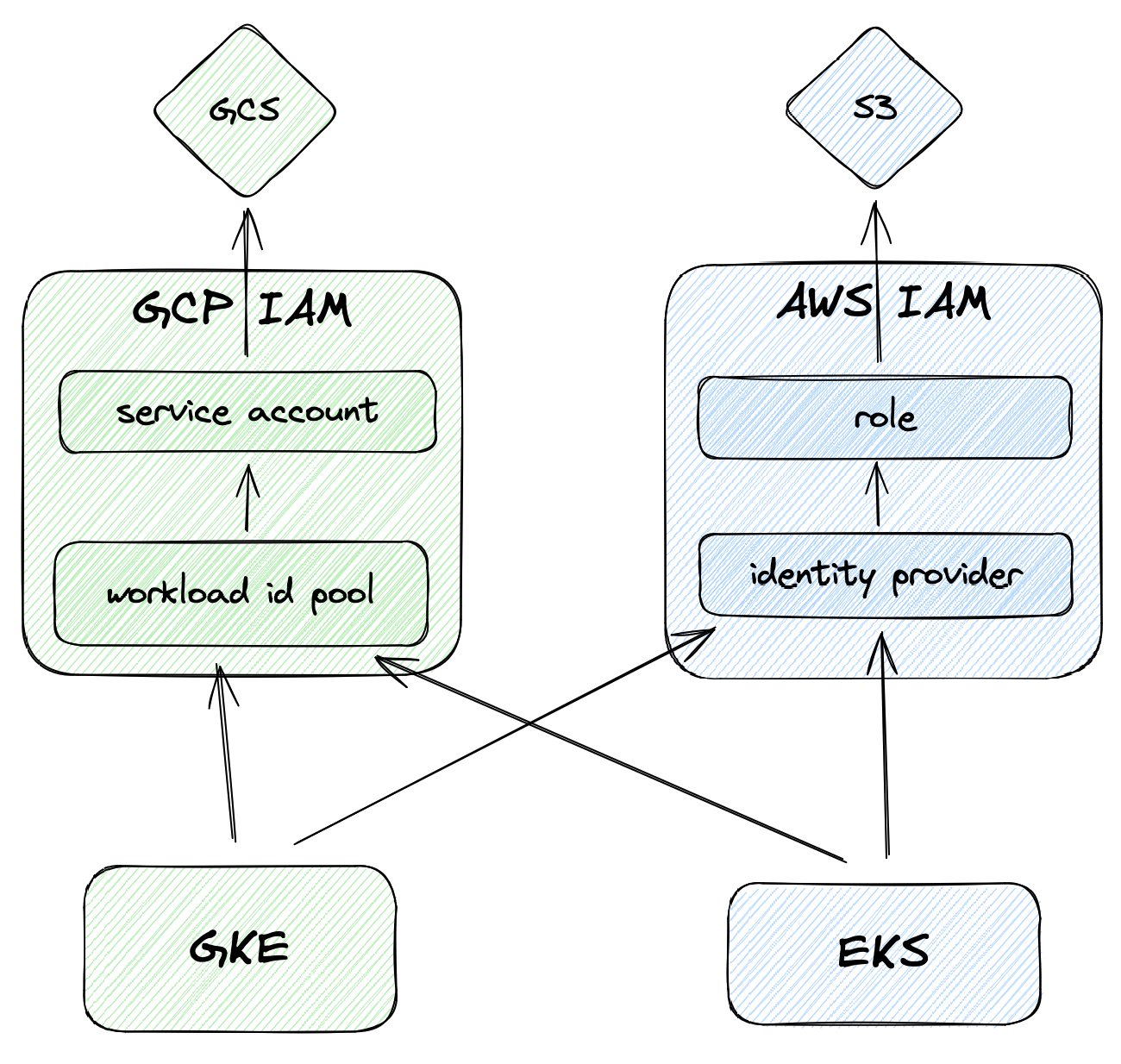
<p>While the above example for GKE to GCP is the recommended way to access GCP resources from Kubernetes, after seeing how the EKS to GCP access is done, one is left wondering if we can bypass the magic interception of requests altogether! In fact, that is definitely possible and actually results in an implementation that is even more consistent across the two clouds.</p>

<p><img src="/img/xcloud-access-2.png" alt="cross-cloud-access-2" width="450px" /></p>

<p>The first step is to remove the <code class="language-plaintext highlighter-rouge">workload_identity_config</code> and <code class="language-plaintext highlighter-rouge">workload_metadata_config</code> configurations from the GKE Cluster and Node Pool configurations in Terraform. Then, a new <code class="language-plaintext highlighter-rouge">google_iam_workload_identity_pool_provider</code> resource for the GKE cluster must be created:</p>

<div class="language-hcl highlighter-rouge"><div class="highlight"><pre class="highlight"><code><span class="nx">resource</span> <span class="s2">"google_iam_workload_identity_pool_provider"</span> <span class="s2">"trusted_gke_cluster"</span> <span class="p">{</span>
  <span class="nx">workload_identity_pool_id</span>          <span class="o">=</span> <span class="nx">google_iam_workload_identity_pool</span><span class="p">.</span><span class="nx">pool</span><span class="p">.</span><span class="nx">workload_identity_pool_id</span>
  <span class="nx">workload_identity_pool_provider_id</span> <span class="o">=</span> <span class="s2">"trusted-gke-cluster"</span>

  <span class="nx">attribute_mapping</span> <span class="o">=</span> <span class="p">{</span>
    <span class="s2">"google.subject"</span> <span class="p">=</span> <span class="s2">"assertion.sub"</span>
  <span class="p">}</span>

  <span class="nx">oidc</span> <span class="p">{</span>
    <span class="nx">issuer_uri</span> <span class="o">=</span> <span class="nx">local</span><span class="p">.</span><span class="nx">gke_issuer_url</span>
  <span class="p">}</span>
<span class="p">}</span>
</code></pre></div></div>

<p>Since we aren’t relying on GCP’s magic, we can also remove the GKE annotation from the K8s service account:</p>

<div class="language-yaml highlighter-rouge"><div class="highlight"><pre class="highlight"><code><span class="na">apiVersion</span><span class="pi">:</span> <span class="s">v1</span>
<span class="na">kind</span><span class="pi">:</span> <span class="s">ServiceAccount</span>
<span class="na">metadata</span><span class="pi">:</span>
  <span class="na">name</span><span class="pi">:</span> <span class="s">oidc-exp-service-account</span>
  <span class="na">namespace</span><span class="pi">:</span> <span class="s">default</span>
</code></pre></div></div>

<p>Finally, the Pod spec for <code class="language-plaintext highlighter-rouge">gcloud-cli</code> becomes identical to the EKS one, which requires the creation of the ConfigMap.</p>]]></content><author><name></name></author><category term="tech" /><category term="kubernetes" /><category term="cloud" /><category term="iam" /><category term="oidc" /><category term="aws" /><category term="gcp" /><category term="eks" /><category term="gke" /><summary type="html"><![CDATA[Written in collaboration with Chloe Blain]]></summary></entry><entry><title type="html">Automating multi architecture workloads in Kubernetes</title><link href="https://www.artur-rodrigues.com/tech/2024/02/19/kubernetes-multiarcher.html" rel="alternate" type="text/html" title="Automating multi architecture workloads in Kubernetes" /><published>2024-02-19T08:00:00+00:00</published><updated>2024-02-19T08:00:00+00:00</updated><id>https://www.artur-rodrigues.com/tech/2024/02/19/kubernetes-multiarcher</id><content type="html" xml:base="https://www.artur-rodrigues.com/tech/2024/02/19/kubernetes-multiarcher.html"><![CDATA[<p>When scheduling workloads, a vanilla Kubernetes installation is unaware of the compatibility of the container images that compose a Pod and the target node architecture. In the best case scenario, the workload is composed of container images that support multiple architectures (<code class="language-plaintext highlighter-rouge">arm64</code> and <code class="language-plaintext highlighter-rouge">amd64</code>), allowing any node to be selected for housing that workload and letting the container runtime itself running in that node fetch the correct image.</p>

<p>However, there might be certain cases where a particular Pod contains container images built for a single architecture (for example, <code class="language-plaintext highlighter-rouge">amd64</code>) - in such cases, Kubernetes won’t prevent that workload from being scheduled on an <code class="language-plaintext highlighter-rouge">arm64</code> node, unless the cluster administrator and/or the application owner have made extra configurations. What are those configurations?</p>

<p>The first possibility is for the cluster administrator to have decided to only run <code class="language-plaintext highlighter-rouge">amd64</code> nodes. That is likely to be largely compatible with all open source tools and images, as <code class="language-plaintext highlighter-rouge">amd64</code> remains the default architecture in the cloud, and most build pipelines will target it. In other words, simply by running only the <code class="language-plaintext highlighter-rouge">amd64</code> architecture, a cluster administrator will probably never face issues around container image compatibility.</p>

<p>The other possibility is for the cluster administrator to put a taint on all <code class="language-plaintext highlighter-rouge">arm64</code> nodes in the cluster. In fact, on GKE this is <a href="https://cloud.google.com/kubernetes-engine/docs/how-to/prepare-arm-workloads-for-deployment#overview">done by default</a>:</p>

<blockquote>
  <p>By default, GKE schedules workloads only to x86-based nodes—Compute Engine machine series with Intel or AMD processors—by placing a taint (kubernetes.io/arch=arm64:NoSchedule) on all Arm nodes. This taint prevents x86-compatible workloads from being inadvertently scheduled to your Arm nodes</p>
</blockquote>

<p>Outside of GKE, a cluster administrator might do the same to the node groups/pools that include ARM instances. In those cases, the pods will need a toleration to be able to run on such nodes.</p>

<p>Finally, application owners also have the possibility to use node selectors to ensure their workloads are only scheduled on <code class="language-plaintext highlighter-rouge">amd64</code> nodes, by targeting the default label <code class="language-plaintext highlighter-rouge">kubernetes.io/arch</code> with value <code class="language-plaintext highlighter-rouge">amd64</code>.</p>

<h2 id="automating-multi-architecture-clusters">Automating multi architecture clusters</h2>

<p>As long as the cluster administrator taints nodes that are part of a node group that might include <code class="language-plaintext highlighter-rouge">arm64</code> instances, we can automate the inclusion of tolerations through a Mutating Admission Controller. This controller will intercept all pod creation events, check the supported architectures for all containers specified in the spec, and include a toleration if all images are multiarch (<code class="language-plaintext highlighter-rouge">arm64</code> and <code class="language-plaintext highlighter-rouge">amd64</code> compatible):</p>

<div class="language-golang highlighter-rouge"><div class="highlight"><pre class="highlight"><code><span class="k">func</span> <span class="n">DoesPodSupportArm64</span><span class="p">(</span><span class="n">cache</span> <span class="n">Cache</span><span class="p">,</span> <span class="n">pod</span> <span class="o">*</span><span class="n">corev1</span><span class="o">.</span><span class="n">Pod</span><span class="p">)</span> <span class="kt">bool</span> <span class="p">{</span>
	<span class="n">supported</span> <span class="o">:=</span> <span class="no">true</span>
	<span class="k">for</span> <span class="n">_</span><span class="p">,</span> <span class="n">container</span> <span class="o">:=</span> <span class="k">range</span> <span class="n">pod</span><span class="o">.</span><span class="n">Spec</span><span class="o">.</span><span class="n">Containers</span> <span class="p">{</span>
		<span class="k">if</span> <span class="o">!</span><span class="n">DoesImageSupportArm64</span><span class="p">(</span><span class="n">cache</span><span class="p">,</span> <span class="n">container</span><span class="o">.</span><span class="n">Image</span><span class="p">)</span> <span class="p">{</span>
			<span class="n">supported</span> <span class="o">=</span> <span class="no">false</span>
		<span class="p">}</span>
	<span class="p">}</span>
	<span class="k">return</span> <span class="n">supported</span>
<span class="p">}</span>
</code></pre></div></div>

<p>A proof-of-concept can be found on <a href="https://github.com/arturhoo/k8smultiarcher/">arturhoo/k8smultiarcher</a>. In particular, <a href="https://github.com/regclient/regclient">regclient/regclient</a> is used to fetch all the supported platforms/architectures through the <a href="https://distribution.github.io/distribution/spec/manifest-v2-2/">Manifests V2 API</a>, which does not require downloading the full image. The project also incorporates a cache and a fail-open mechanism (in case of failures or timeout, no toleration is added).</p>

<p>One important implementation detail is that the toleration added is for a multi-architecture node group, not a <code class="language-plaintext highlighter-rouge">arm64</code>-only one. This is particularly important when running a cluster autoscaling strategy (e.g. <a href="https://karpenter.sh/">Karpenter</a>) that taps into several instance types and spot offerings, i.e. at certain times it might be cheaper to run <code class="language-plaintext highlighter-rouge">amd64</code> nodes.</p>

<p>A full end-to-end example can be <a href="https://github.com/arturhoo/k8smultiarcher/blob/main/.github/workflows/kind-test.yaml">found on the test suite for the project</a>.</p>]]></content><author><name></name></author><category term="tech" /><category term="kubernetes" /><summary type="html"><![CDATA[When scheduling workloads, a vanilla Kubernetes installation is unaware of the compatibility of the container images that compose a Pod and the target node architecture. In the best case scenario, the workload is composed of container images that support multiple architectures (arm64 and amd64), allowing any node to be selected for housing that workload and letting the container runtime itself running in that node fetch the correct image.]]></summary></entry><entry><title type="html">Rate limiting Kubernetes pod creation with dynamic admission control</title><link href="https://www.artur-rodrigues.com/tech/2023/10/22/rate-limiting-kubernetes-pod-creation.html" rel="alternate" type="text/html" title="Rate limiting Kubernetes pod creation with dynamic admission control" /><published>2023-10-22T08:00:00+00:00</published><updated>2023-10-22T08:00:00+00:00</updated><id>https://www.artur-rodrigues.com/tech/2023/10/22/rate-limiting-kubernetes-pod-creation</id><content type="html" xml:base="https://www.artur-rodrigues.com/tech/2023/10/22/rate-limiting-kubernetes-pod-creation.html"><![CDATA[<p><a href="https://kubernetes.io/docs/concepts/policy/resource-quotas/">Resource Quotas</a> and <a href="https://kubernetes.io/docs/concepts/policy/limit-range/">Limit Ranges</a> are common ways to limit the number of pods (or resources used by pods) in Kubernetes clusters. However, when using Jobs for big-data or machine-learning pipelines it might be desirable to also start considering the rate which pods are created, especially if jobs are short-lived and there’s a concern that the control plane might be overwhelmed.</p>

<p>The first line of defence should be configuring the API server flags <code class="language-plaintext highlighter-rouge">--max-requests-inflight</code> and <code class="language-plaintext highlighter-rouge">--max-mutating-requests-inflight</code>, followed by configuring <a href="https://kubernetes.io/docs/concepts/cluster-administration/flow-control/">API Priority and Fairness</a>, which allows for fine grained requests to be deprioritised (and ultimately rate limited) relative to other requests. Finally, the alpha <a href="https://kubernetes.io/docs/reference/config-api/apiserver-eventratelimit.v1alpha1/#eventratelimit-admission-k8s-io-v1alpha1-Configuration">Event Rate Limit</a> can put a ceiling on the number of requests per second sent to the API server on a given namespace, for example.</p>

<p>Thinking about a final line of defence, I decided to explore implementing an admission webhook that would be configured (through a <code class="language-plaintext highlighter-rouge">ValidatingWebhookConfiguration</code>) to intercept all pod creation requests and enforce a rate limit.</p>

<div class="language-golang highlighter-rouge"><div class="highlight"><pre class="highlight"><code><span class="k">var</span> <span class="n">limiter</span> <span class="o">=</span> <span class="n">rate</span><span class="o">.</span><span class="n">NewLimiter</span><span class="p">(</span><span class="n">rate</span><span class="o">.</span><span class="n">Every</span><span class="p">(</span><span class="m">10</span><span class="o">*</span><span class="n">time</span><span class="o">.</span><span class="n">Second</span><span class="p">),</span> <span class="m">1</span><span class="p">)</span>

<span class="k">func</span> <span class="n">validatingHandler</span><span class="p">(</span><span class="n">c</span> <span class="o">*</span><span class="n">gin</span><span class="o">.</span><span class="n">Context</span><span class="p">)</span> <span class="p">{</span>
	<span class="k">var</span> <span class="n">review</span> <span class="n">admissionv1</span><span class="o">.</span><span class="n">AdmissionReview</span>
	<span class="k">if</span> <span class="n">err</span> <span class="o">:=</span> <span class="n">c</span><span class="o">.</span><span class="n">Bind</span><span class="p">(</span><span class="o">&amp;</span><span class="n">review</span><span class="p">);</span> <span class="n">err</span> <span class="o">!=</span> <span class="no">nil</span> <span class="p">{</span>
		<span class="k">return</span>
	<span class="p">}</span>

	<span class="n">allowed</span> <span class="o">:=</span> <span class="n">limiter</span><span class="o">.</span><span class="n">Allow</span><span class="p">()</span>
	<span class="k">var</span> <span class="n">status</span><span class="p">,</span> <span class="n">msg</span> <span class="kt">string</span>
	<span class="k">if</span> <span class="n">allowed</span> <span class="p">{</span>
		<span class="n">status</span> <span class="o">=</span> <span class="n">metav1</span><span class="o">.</span><span class="n">StatusSuccess</span>
	<span class="p">}</span> <span class="k">else</span> <span class="p">{</span>
		<span class="n">status</span> <span class="o">=</span> <span class="n">metav1</span><span class="o">.</span><span class="n">StatusFailure</span>
		<span class="n">msg</span> <span class="o">=</span> <span class="s">"rate limit exceeded"</span>
	<span class="p">}</span>

	<span class="n">review</span><span class="o">.</span><span class="n">Response</span> <span class="o">=</span> <span class="o">&amp;</span><span class="n">admissionv1</span><span class="o">.</span><span class="n">AdmissionResponse</span><span class="p">{</span>
		<span class="n">UID</span><span class="o">:</span>     <span class="n">review</span><span class="o">.</span><span class="n">Request</span><span class="o">.</span><span class="n">UID</span><span class="p">,</span>
		<span class="n">Allowed</span><span class="o">:</span> <span class="n">allowed</span><span class="p">,</span>
		<span class="n">Result</span><span class="o">:</span> <span class="o">&amp;</span><span class="n">metav1</span><span class="o">.</span><span class="n">Status</span><span class="p">{</span>
			<span class="n">Status</span><span class="o">:</span>  <span class="n">status</span><span class="p">,</span>
			<span class="n">Message</span><span class="o">:</span> <span class="n">msg</span><span class="p">,</span>
		<span class="p">},</span>
	<span class="p">}</span>
	<span class="n">c</span><span class="o">.</span><span class="n">JSON</span><span class="p">(</span><span class="m">200</span><span class="p">,</span> <span class="n">review</span><span class="p">)</span>
<span class="p">}</span>
</code></pre></div></div>

<p>Using <code class="language-plaintext highlighter-rouge">golang.org/x/time/rate</code>, we keep a limiter that allows one request every 10 seconds. If the request is allowed, we return <code class="language-plaintext highlighter-rouge">StatusSuccess</code>, otherwise we return a <code class="language-plaintext highlighter-rouge">StatusFailure</code> which will prevent the pod from being created.</p>

<p>The configuration itself, defines a rule that narrows the scope to only pod creation with a ‘fail open’ failure policy:</p>

<div class="language-yaml highlighter-rouge"><div class="highlight"><pre class="highlight"><code><span class="na">apiVersion</span><span class="pi">:</span> <span class="s">admissionregistration.k8s.io/v1</span>
<span class="na">kind</span><span class="pi">:</span> <span class="s">ValidatingWebhookConfiguration</span>
<span class="na">metadata</span><span class="pi">:</span>
  <span class="na">name</span><span class="pi">:</span> <span class="s">k8slimiter-pod-creation</span>
  <span class="na">annotations</span><span class="pi">:</span>
    <span class="na">cert-manager.io/inject-ca-from</span><span class="pi">:</span> <span class="s">k8slimiter/k8slimiter-certificate</span>
<span class="na">webhooks</span><span class="pi">:</span>
  <span class="pi">-</span> <span class="na">name</span><span class="pi">:</span> <span class="s">k8slimiter-pod-creation.k8slimiter.svc</span>
    <span class="na">admissionReviewVersions</span><span class="pi">:</span>
      <span class="pi">-</span> <span class="s">v1</span>
    <span class="na">clientConfig</span><span class="pi">:</span>
      <span class="na">service</span><span class="pi">:</span>
        <span class="na">name</span><span class="pi">:</span> <span class="s">k8slimiter-service</span>
        <span class="na">namespace</span><span class="pi">:</span> <span class="s">k8slimiter</span>
        <span class="na">path</span><span class="pi">:</span> <span class="s2">"</span><span class="s">/validate"</span>
    <span class="na">rules</span><span class="pi">:</span>
      <span class="pi">-</span> <span class="na">apiGroups</span><span class="pi">:</span> <span class="pi">[</span><span class="s2">"</span><span class="s">"</span><span class="pi">]</span>
        <span class="na">apiVersions</span><span class="pi">:</span> <span class="pi">[</span><span class="s2">"</span><span class="s">v1"</span><span class="pi">]</span>
        <span class="na">operations</span><span class="pi">:</span> <span class="pi">[</span><span class="s2">"</span><span class="s">CREATE"</span><span class="pi">]</span>
        <span class="na">resources</span><span class="pi">:</span> <span class="pi">[</span><span class="s2">"</span><span class="s">pods"</span><span class="pi">]</span>
    <span class="na">failurePolicy</span><span class="pi">:</span> <span class="s">Ignore</span>
    <span class="na">sideEffects</span><span class="pi">:</span> <span class="s">None</span>
</code></pre></div></div>

<p>With those in place, creating pods in quick succession leads to the expected rate limiting behaviour:</p>

<div class="language-plaintext highlighter-rouge"><div class="highlight"><pre class="highlight"><code>$ kubectl run "tmp-pod-$(date +%s)" --restart Never --image debian:12-slim -- sleep 1
pod/tmp-pod-1698005111 created
$ kubectl run "tmp-pod-$(date +%s)" --restart Never --image debian:12-slim -- sleep 1
Error from server: admission webhook "k8slimiter-pod-creation.k8slimiter.svc" denied the request: rate limit exceeded
</code></pre></div></div>

<p>A full working example can be found on <a href="https://github.com/arturhoo/k8slimiter">arturhoo/k8slimiter</a>, which leverages <a href="https://github.com/gin-gonic/gin">Gin</a> and <a href="https://cert-manager.io/"><code class="language-plaintext highlighter-rouge">cert-manager</code></a> to achieve a minimal and straightforward  admission webhook setup.</p>]]></content><author><name></name></author><category term="tech" /><category term="kubernetes" /><summary type="html"><![CDATA[Resource Quotas and Limit Ranges are common ways to limit the number of pods (or resources used by pods) in Kubernetes clusters. However, when using Jobs for big-data or machine-learning pipelines it might be desirable to also start considering the rate which pods are created, especially if jobs are short-lived and there’s a concern that the control plane might be overwhelmed.]]></summary></entry><entry><title type="html">Impossible Kubernetes node drains</title><link href="https://www.artur-rodrigues.com/tech/2023/03/30/impossible-kubectl-drains.html" rel="alternate" type="text/html" title="Impossible Kubernetes node drains" /><published>2023-03-30T08:00:00+00:00</published><updated>2023-03-30T08:00:00+00:00</updated><id>https://www.artur-rodrigues.com/tech/2023/03/30/impossible-kubectl-drains</id><content type="html" xml:base="https://www.artur-rodrigues.com/tech/2023/03/30/impossible-kubectl-drains.html"><![CDATA[<h2 id="context">Context</h2>

<p>Kubernetes cluster administrators sometimes perform maintenance operations in nodes, such as hardware swaps, Kernel and Kubernetes version upgrades. On the other hand, application developers, might be interested in ensuring that their applications remain available during those maintenance operations. This is usually achieved through <a href="https://kubernetes.io/docs/tasks/run-application/configure-pdb/">Disruption Budgets</a> - here’s what the official docs have to say about them:</p>

<blockquote>
  <p>[They] limit the number of concurrent disruptions that your application experiences, allowing for higher availability while permitting the cluster administrator to manage the clusters nodes.</p>
</blockquote>

<h2 id="practical-example">Practical example</h2>

<p>To demonstrate how they’re utilized, let’s start with a simple <code class="language-plaintext highlighter-rouge">Deployment</code> of two <code class="language-plaintext highlighter-rouge">nginx</code> replicas:</p>

<div class="language-yaml highlighter-rouge"><div class="highlight"><pre class="highlight"><code><span class="na">apiVersion</span><span class="pi">:</span> <span class="s">apps/v1</span>
<span class="na">kind</span><span class="pi">:</span> <span class="s">Deployment</span>
<span class="na">metadata</span><span class="pi">:</span>
  <span class="na">name</span><span class="pi">:</span> <span class="s">nginx-deployment</span>
<span class="na">spec</span><span class="pi">:</span>
  <span class="na">selector</span><span class="pi">:</span>
    <span class="na">matchLabels</span><span class="pi">:</span>
      <span class="na">app</span><span class="pi">:</span> <span class="s">nginx</span>
  <span class="na">replicas</span><span class="pi">:</span> <span class="m">2</span>
  <span class="na">template</span><span class="pi">:</span>
    <span class="na">metadata</span><span class="pi">:</span>
      <span class="na">labels</span><span class="pi">:</span>
        <span class="na">app</span><span class="pi">:</span> <span class="s">nginx</span>
</code></pre></div></div>

<p>By default, old pods will be replaced by new ones following the <a href="https://kubernetes.io/docs/concepts/workloads/controllers/deployment/#strategy"><code class="language-plaintext highlighter-rouge">RollingUpdate</code> strategy</a>, which gradually replaces old pods with new ones. Through the <code class="language-plaintext highlighter-rouge">maxSurge</code> and <code class="language-plaintext highlighter-rouge">maxUnavailable</code> options, an application developer can control how those pods are replaced. In the example below, the number of available replicas should never be lower than the deployment size itself and at most one extra pod can be created:</p>

<div class="language-yaml highlighter-rouge"><div class="highlight"><pre class="highlight"><code><span class="nn">...</span>
  <span class="na">strategy</span><span class="pi">:</span>
    <span class="na">type</span><span class="pi">:</span> <span class="s">RollingUpdate</span>
    <span class="na">rollingUpdate</span><span class="pi">:</span>
      <span class="na">maxSurge</span><span class="pi">:</span> <span class="m">1</span>
      <span class="na">maxUnavailable</span><span class="pi">:</span> <span class="m">0</span>
<span class="nn">...</span>
</code></pre></div></div>

<p>Finally, for the sake of the example, let’s ensure that two <code class="language-plaintext highlighter-rouge">nginx</code> pods never run on the same node through a <code class="language-plaintext highlighter-rouge">podAntiAffinity</code> rule:</p>

<div class="language-yaml highlighter-rouge"><div class="highlight"><pre class="highlight"><code><span class="nn">...</span>
      <span class="na">affinity</span><span class="pi">:</span>
        <span class="na">podAntiAffinity</span><span class="pi">:</span>
          <span class="na">requiredDuringSchedulingIgnoredDuringExecution</span><span class="pi">:</span>
            <span class="pi">-</span> <span class="na">labelSelector</span><span class="pi">:</span>
                <span class="na">matchExpressions</span><span class="pi">:</span>
                  <span class="pi">-</span> <span class="na">key</span><span class="pi">:</span> <span class="s">app</span>
                    <span class="na">operator</span><span class="pi">:</span> <span class="s">In</span>
                    <span class="na">values</span><span class="pi">:</span>
                      <span class="pi">-</span> <span class="s">nginx</span>
              <span class="na">topologyKey</span><span class="pi">:</span> <span class="s">kubernetes.io/hostname</span>
<span class="nn">...</span>
</code></pre></div></div>

<p>At this point, the application developer can rollout new versions of their deployment safely. However, the availability of the application is still at risk of being ‘disrupted’ by maintenances that affect the pods. The cluster administrator can drain all nodes in the cluster, leaving all pods of the deployment in the pending state:</p>

<div class="language-plaintext highlighter-rouge"><div class="highlight"><pre class="highlight"><code>$ kubectl get deployment
NAME               READY   UP-TO-DATE   AVAILABLE   AGE
nginx-deployment   0/2     2            0           110m
$ kubectl get pods
NAME                                READY   STATUS    RESTARTS   AGE
nginx-deployment-855f7d96b9-8d48g   0/1     Pending   0          3m22s
nginx-deployment-855f7d96b9-bgvzb   0/1     Pending   0          3m18s
</code></pre></div></div>

<p>This is where Disruption Budgets are useful. The application developer might decide to create the following <code class="language-plaintext highlighter-rouge">PodDisruptionBudget</code>, which has similar semantics to the <code class="language-plaintext highlighter-rouge">RollingUpdate</code>  strategy of the <code class="language-plaintext highlighter-rouge">Deployment</code>:</p>

<div class="language-yaml highlighter-rouge"><div class="highlight"><pre class="highlight"><code><span class="na">apiVersion</span><span class="pi">:</span> <span class="s">policy/v1</span>
<span class="na">kind</span><span class="pi">:</span> <span class="s">PodDisruptionBudget</span>
<span class="na">metadata</span><span class="pi">:</span>
  <span class="na">name</span><span class="pi">:</span> <span class="s">nginx-pdb</span>
<span class="na">spec</span><span class="pi">:</span>
  <span class="na">maxUnavailable</span><span class="pi">:</span> <span class="m">0</span>
  <span class="na">selector</span><span class="pi">:</span>
    <span class="na">matchLabels</span><span class="pi">:</span>
      <span class="na">app</span><span class="pi">:</span> <span class="s">nginx</span>
</code></pre></div></div>

<p>However, setting a Disruption Budget with <code class="language-plaintext highlighter-rouge">maxUnavailable: 0</code> has <a href="https://kubernetes.io/docs/tasks/run-application/configure-pdb/#specifying-a-poddisruptionbudget">important implications</a>:</p>

<blockquote>
  <p>If you set <code class="language-plaintext highlighter-rouge">maxUnavailable</code> to 0% or 0, or you set <code class="language-plaintext highlighter-rouge">minAvailable</code> to 100% or the number of replicas, you are requiring zero voluntary evictions. When you set zero voluntary evictions for a workload object such as ReplicaSet, then you cannot successfully drain a Node running one of those Pods. If you try to drain a Node where an unevictable Pod is running, the drain never completes. This is permitted as per the semantics of <code class="language-plaintext highlighter-rouge">PodDisruptionBudget</code>.</p>
</blockquote>

<h2 id="impossible-node-drains">Impossible node drains</h2>

<p>As suggested by the PDB docs, if we try to drain a node where a pod protected by a PDB with such characteristics exists, it will never complete. Take a cluster with four nodes as an example:</p>

<div class="language-plaintext highlighter-rouge"><div class="highlight"><pre class="highlight"><code>$ kuebctl get nodes
NAME                 STATUS   ROLES           AGE   VERSION
kind-control-plane   Ready    control-plane   58s   v1.25.3
kind-worker          Ready    &lt;none&gt;          34s   v1.25.3
kind-worker2         Ready    &lt;none&gt;          34s   v1.25.3
kind-worker3         Ready    &lt;none&gt;          34s   v1.25.3
kind-worker4         Ready    &lt;none&gt;          33s   v1.25.3
$ kubectl get pods -o wide
NAME                               READY   STATUS    RESTARTS   AGE   IP           NODE           NOMINATED NODE   READINESS GATES
nginx-deployment-bdccd6b79-84zhj   1/1     Running   0          41s   10.244.3.2   kind-worker    &lt;none&gt;           &lt;none&gt;
nginx-deployment-bdccd6b79-hqbgx   1/1     Running   0          41s   10.244.1.2   kind-worker3   &lt;none&gt;           &lt;none&gt;
</code></pre></div></div>

<p>If we try to drain one of the nodes, the process will never complete:</p>

<div class="language-plaintext highlighter-rouge"><div class="highlight"><pre class="highlight"><code>$ kubectl drain --ignore-daemonsets kind-worker
node/kind-worker cordoned
Warning: ignoring DaemonSet-managed Pods: kube-system/kindnet-dkp4b, kube-system/kube-proxy-c66b6
evicting pod default/nginx-deployment-bdccd6b79-84zhj
error when evicting pods/"nginx-deployment-bdccd6b79-84zhj" -n "default" (will retry after 5s): Cannot evict pod as it would violate the pod's disruption budget.
evicting pod default/nginx-deployment-bdccd6b79-84zhj
error when evicting pods/"nginx-deployment-bdccd6b79-84zhj" -n "default" (will retry after 5s): Cannot evict pod as it would violate the pod's disruption budget.
evicting pod default/nginx-deployment-bdccd6b79-84zhj
error when evicting pods/"nginx-deployment-bdccd6b79-84zhj" -n "default" (will retry after 5s): Cannot evict pod as it would violate the pod's disruption budget.
evicting pod default/nginx-deployment-bdccd6b79-84zhj
...
</code></pre></div></div>

<h2 id="a-workaround">A workaround</h2>

<p>However, in some situations, such as the one above, a cluster administrator can successfully drain the node by issuing a restart of the application blocking the drain:</p>

<div class="language-plaintext highlighter-rouge"><div class="highlight"><pre class="highlight"><code>$ kubectl rollout restart deployment nginx-deployment
deployment.apps/nginx-deployment restarted
</code></pre></div></div>

<p>Here’s a full example:</p>

<p><img src="/img/kubectl-drain-1.svg" alt="cast-1" /></p>

<p>This creates a dilemma: Disruption Budgets with those characteristics are explicitly communicating their application’s “desire” to never be drained. On the other hand, the application’s strategy allows the application to be restarted while still respecting its <code class="language-plaintext highlighter-rouge">RollingUpdate</code> spec.</p>

<p>In practical terms, the cluster administrator can perform the necessary maintenances while respecting the availability characteristics from the application. But should cluster administrators restart applications in the cluster without the application developer consent?</p>

<p>In some circumstances, for example companies with SRE teams maintaining production clusters and Product teams developing applications, such operations could be performed, as there might not be strict terms of service in place.</p>

<h2 id="possible-solutions">Possible solutions</h2>

<p>I <a href="https://kubernetes.slack.com/archives/C2GL57FJ4/p1678958503185179">discussed this situation</a> on the Kubernetes sig-cli Slack channel, and a few folks were receptive to the idea of giving Kubernetes users a way to automatically workaround impossible drains.</p>

<p>The drain logic only lives in <code class="language-plaintext highlighter-rouge">kubectl</code>, which <a href="https://github.com/kubernetes/kubectl/blob/65639830b2b0e5f6b254d05b911b7676eb7757d2/pkg/drain/drain.go#L301">calls the Eviction API</a> for each pod running on the node. My first idea was to introduce a new flag to <code class="language-plaintext highlighter-rouge">kubectl drain</code> that would trigger <code class="language-plaintext highlighter-rouge">rollout restart</code> of the blocking controllers (<code class="language-plaintext highlighter-rouge">Deployment</code>, <code class="language-plaintext highlighter-rouge">StatefulSet</code>, <code class="language-plaintext highlighter-rouge">ReplicaSet</code>) when the Eviction API returned a <a href="https://kubernetes.io/docs/concepts/scheduling-eviction/api-eviction/#how-api-initiated-eviction-works">429 response</a>.</p>

<p>When proposing this in the sig-cli fortnightly meeting, we concluded that the drain behavior sufficiently meets the existing semantics and that impossible drain situations are opportunities to educate application developers of the implications of those restrictive PDBs. For example, OpenShift’s Kubernetes Controller Manager Operator <a href="https://github.com/openshift/cluster-kube-controller-manager-operator/blob/2b6494a23a0882c1c1fb870474d60358e7f5bff8/manifests/0000_90_kube-controller-manager-operator_05_alerts.yaml#L25-L44">has alerts configured</a> for those <a href="https://github.com/openshift/runbooks/blob/master/alerts/cluster-kube-controller-manager-operator/PodDisruptionBudgetAtLimit.md">restrictive PDBs</a>:</p>

<blockquote>
  <p>Standard workloads should have at least one pod more than is desired to support API-initiated eviction. Workloads that are at the minimum disruption allowed level violate this and could block node drain. This is important for node maintenance and cluster upgrades.</p>
</blockquote>

<p>Nonetheless, the group suggested writing this up (this blog post) and presenting it to the sig-apps and sig-api-machinery groups. A potential proposal could be to introduce new functionality to the Eviction API, alongside a new field to the <code class="language-plaintext highlighter-rouge">PodDisruptionBudget</code> spec that would trigger the update of the blocking controller. For example:</p>

<div class="language-yaml highlighter-rouge"><div class="highlight"><pre class="highlight"><code><span class="na">apiVersion</span><span class="pi">:</span> <span class="s">policy/v1</span>
<span class="na">kind</span><span class="pi">:</span> <span class="s">PodDisruptionBudget</span>
<span class="na">metadata</span><span class="pi">:</span>
  <span class="na">name</span><span class="pi">:</span> <span class="s">nginx-pdb</span>
<span class="na">spec</span><span class="pi">:</span>
  <span class="na">rolloutRestartAllowed</span><span class="pi">:</span> <span class="kc">true</span>
  <span class="na">maxUnavailable</span><span class="pi">:</span> <span class="m">0</span>
  <span class="na">selector</span><span class="pi">:</span>
    <span class="na">matchLabels</span><span class="pi">:</span>
      <span class="na">app</span><span class="pi">:</span> <span class="s">nginx</span>
</code></pre></div></div>

<p>Here, the application developer would be explicitly granting permission to the cluster administrator to perform updates to their deployment or applications.</p>]]></content><author><name></name></author><category term="tech" /><category term="kubernetes" /><summary type="html"><![CDATA[Context]]></summary></entry><entry><title type="html">Experiments with Kafka’s head-of-line blocking</title><link href="https://www.artur-rodrigues.com/tech/2023/03/21/kafka-head-of-line-blocking.html" rel="alternate" type="text/html" title="Experiments with Kafka’s head-of-line blocking" /><published>2023-03-21T12:00:00+00:00</published><updated>2023-03-21T12:00:00+00:00</updated><id>https://www.artur-rodrigues.com/tech/2023/03/21/kafka-head-of-line-blocking</id><content type="html" xml:base="https://www.artur-rodrigues.com/tech/2023/03/21/kafka-head-of-line-blocking.html"><![CDATA[<h2 id="context">Context</h2>

<p>Kafka is a distributed message system that excels in high throughput architectures with many listeners. However, Kafka is also often used as job queue solution and, in this context, its head-of-line blocking characteristics can lead to increased latency. Let’s build an experiment to explore it in practice.</p>

<h2 id="kafka-architecture">Kafka Architecture</h2>

<p>Messages are sent to topics in Kafka which are hashed and assigned to partitions - one topic has one or more partitions. Multiple consumers can read from a topic by forming a Consumer Group, with each one being automatically assigned a subset of the partitions for a given topic.</p>

<p><img src="/img/kafka-architecture-1.png" alt="kafka-architecture-1" /></p>

<p>No two consumers from the same Consumer Group can read from the same partition. Therefore, to avoid idle consumers, a topic must have at least as many partitions as there are consumers.</p>

<p>At this point, head-of-line blocking might be starting to make sense. If <code class="language-plaintext highlighter-rouge">Consumer 0</code> takes a long time to perform the work associated with a message (either because the work is expensive or because it is under resource pressure), all other pending messages in the partitions it is responsible for will remain pending.</p>

<p>Side note: where Kafka message streaming capabilities really shine is when you have many subscribers. A new consumer group can be formed and process the <strong>same messages</strong> as the original group, on its own pace. At this point, it is no longer a worker queue in the traditional sense.</p>

<p><img src="/img/kafka-architecture-2.png" alt="kafka-architecture-2" /></p>

<h2 id="beanstalkd-architecture">Beanstalkd Architecture</h2>

<p>This is in contrast to other solutions like RabbitMQ or beanstalkd where, regardless of the number of consumers, pending jobs will be served to the first consumer that asks for one on a given queue.</p>

<p>Let’s take a look at beanstalkd, which I have <a href="/tech/2015/06/04/beanstalkd-a-simple-and-reliable-message-queue.html">introduced in a previous blog post</a>:</p>

<p><img src="/img/beanstalkd-architecture.png" alt="kafka-queue-results" /></p>

<p>With beanstalkd, jobs are sent to tubes. Consumers simply connect to the server and reserve jobs from a given tube. For a given beanstalkd server, jobs are given out in the same order they were enqueued.</p>

<p>Here, head-of-line blocking is no longer a concern, as jobs will continue to be served from the queue to available consumers even if a particular consumer is slow. Contrary to Kafka with multiple consumer groups, a job in a tube cannot be served to two consumers in the happy path. When reservations times out, beanstalkd will requeue that job. These are traditional work queue primitives.</p>

<h2 id="experiment">Experiment</h2>

<p>In this experiment, each job represents a unit of work: a synchronous sleep. The sleep duration is determined by the producer that creates 100 jobs in total. Every job has a sleep value of 0, except for 4 of them which have a sleep value of 10s.</p>

<div class="language-ruby highlighter-rouge"><div class="highlight"><pre class="highlight"><code><span class="n">beanstalkd_tube</span> <span class="o">=</span> <span class="n">beanstalkd</span><span class="p">.</span><span class="nf">tubes</span><span class="p">[</span><span class="no">BEANSTALKD_MAIN_TUBE</span><span class="p">]</span>
<span class="mi">100</span><span class="p">.</span><span class="nf">times</span> <span class="k">do</span> <span class="o">|</span><span class="n">i</span><span class="o">|</span>
  <span class="n">msg</span> <span class="o">=</span> <span class="p">(</span><span class="n">i</span> <span class="o">%</span> <span class="mi">25</span><span class="p">).</span><span class="nf">zero?</span> <span class="p">?</span> <span class="mi">10</span> <span class="p">:</span> <span class="mi">0</span>

  <span class="n">beanstalkd_tube</span><span class="p">.</span><span class="nf">put</span><span class="p">(</span><span class="n">msg</span><span class="p">.</span><span class="nf">to_s</span><span class="p">)</span>

  <span class="n">kafka_producer</span><span class="p">.</span><span class="nf">produce</span><span class="p">(</span>
    <span class="ss">topic: </span><span class="no">KAFKA_MAIN_TOPIC</span><span class="p">,</span>
    <span class="ss">payload: </span><span class="n">msg</span><span class="p">.</span><span class="nf">to_s</span><span class="p">,</span>
    <span class="ss">key: </span><span class="s2">"key-</span><span class="si">#{</span><span class="n">i</span><span class="si">}</span><span class="s2">"</span>
  <span class="p">)</span>
<span class="k">end</span>
</code></pre></div></div>

<p>If we only had a single consumer, the total time to complete all jobs would be at least 40s, as that consumer would sleep for 10s four times. If we had an unlimited number of consumers, the minimum total time would be 10s, as at least four consumers would have to sleep for 10s in parallel.</p>

<p>Back to the experiment, both Kafka and beanstalkd are set up, each with five consumers. The Kafka topic is configured with 10 partitions, therefore, each Kafka consumer is responsible for two partitions, in a single consumer group configuration. Below are the implementations for each consumer type:</p>

<div class="language-ruby highlighter-rouge"><div class="highlight"><pre class="highlight"><code><span class="n">consumer</span><span class="p">.</span><span class="nf">subscribe</span><span class="p">(</span><span class="no">KAFKA_MAIN_TOPIC</span><span class="p">)</span>
<span class="n">consumer</span><span class="p">.</span><span class="nf">each</span> <span class="k">do</span> <span class="o">|</span><span class="n">msg</span><span class="o">|</span>
  <span class="n">duration</span> <span class="o">=</span> <span class="n">msg</span><span class="p">.</span><span class="nf">payload</span><span class="p">.</span><span class="nf">to_i</span>
  <span class="n">log</span><span class="p">.</span><span class="nf">info</span> <span class="s1">'Going to sleep'</span> <span class="k">if</span> <span class="n">duration</span><span class="p">.</span><span class="nf">positive?</span>
  <span class="nb">sleep</span><span class="p">(</span><span class="n">msg</span><span class="p">.</span><span class="nf">payload</span><span class="p">.</span><span class="nf">to_i</span><span class="p">)</span>
  <span class="n">producer</span><span class="p">.</span><span class="nf">produce</span><span class="p">(</span>
    <span class="ss">topic: </span><span class="no">KAFKA_COUNTER_TOPIC</span><span class="p">,</span>
    <span class="ss">payload: </span><span class="s1">'dummy'</span>
  <span class="p">)</span>
<span class="k">end</span>
</code></pre></div></div>

<div class="language-ruby highlighter-rouge"><div class="highlight"><pre class="highlight"><code><span class="n">main_tube</span> <span class="o">=</span> <span class="n">beanstalkd</span><span class="p">.</span><span class="nf">tubes</span><span class="p">[</span><span class="no">BEANSTALKD_MAIN_TUBE</span><span class="p">]</span>
<span class="n">counter_tube</span> <span class="o">=</span> <span class="n">beanstalkd</span><span class="p">.</span><span class="nf">tubes</span><span class="p">[</span><span class="no">BEANSTALKD_COUNTER_TUBE</span><span class="p">]</span>
<span class="kp">loop</span> <span class="k">do</span>
  <span class="n">job</span> <span class="o">=</span> <span class="n">main_tube</span><span class="p">.</span><span class="nf">reserve</span>
  <span class="n">duration</span> <span class="o">=</span> <span class="n">job</span><span class="p">.</span><span class="nf">body</span><span class="p">.</span><span class="nf">to_i</span>
  <span class="n">log</span><span class="p">.</span><span class="nf">info</span> <span class="s1">'Going to sleep'</span> <span class="k">if</span> <span class="n">duration</span><span class="p">.</span><span class="nf">positive?</span>
  <span class="nb">sleep</span><span class="p">(</span><span class="n">duration</span><span class="p">)</span>
  <span class="n">counter_tube</span><span class="p">.</span><span class="nf">put</span><span class="p">(</span><span class="s1">'dummy'</span><span class="p">)</span>
  <span class="n">job</span><span class="p">.</span><span class="nf">delete</span>
<span class="k">end</span>
</code></pre></div></div>

<p>After sleeping, consumers produce a dummy message to a different topic/tube, which is used by an out of bound watcher process that keeps track of global progress. Each watcher process starts the clock when the first dummy message is received and stops i when the 100th message is received.</p>

<p>To kickstart the experiment, we start both Kafka and beanstalkd, five consumers for each and the two watcher processes:</p>

<div class="language-text highlighter-rouge"><div class="highlight"><pre class="highlight"><code>$ docker-compose up
queue-beanstalkd-watcher-1   | I, [2023-03-19T22:03:59] Started beanstalkd watcher
queue-beanstalkd-consumer-1  | I, [2023-03-19T22:04:00] Connected to beanstalkd
queue-beanstalkd-consumer-3  | I, [2023-03-19T22:04:01] Connected to beanstalkd
queue-beanstalkd-consumer-4  | I, [2023-03-19T22:04:01] Connected to beanstalkd
queue-beanstalkd-consumer-5  | I, [2023-03-19T22:04:02] Connected to beanstalkd
queue-beanstalkd-consumer-2  | I, [2023-03-19T22:04:02] Connected to beanstalkd
queue-kafka-define-topic-1   | I, [2023-03-19T22:04:11] Topics created!
queue-kafka-define-topic-1 exited with code 0
queue-kafka-watcher-1        | I, [2023-03-19T22:04:12] Started Kafka watcher
queue-kafka-consumer-2       | I, [2023-03-19T22:04:13] Subscribed to kafka topic
queue-kafka-consumer-1       | I, [2023-03-19T22:04:14] Subscribed to kafka topic
queue-kafka-consumer-4       | I, [2023-03-19T22:04:14] Subscribed to kafka topic
queue-kafka-consumer-5       | I, [2023-03-19T22:04:14] Subscribed to kafka topic
queue-kafka-consumer-3       | I, [2023-03-19T22:04:15] Subscribed to kafka topic
</code></pre></div></div>

<p>At this point, without no messages having been produced, we can inspect the topology of Kafka partitions and consumers:</p>

<div class="language-text highlighter-rouge"><div class="highlight"><pre class="highlight"><code>$ kafka-consumer-groups.sh --describe --group main-group --bootstrap-server localhost:9092
GROUP           TOPIC           PARTITION  CURRENT-OFFSET  LOG-END-OFFSET  LAG             CONSUMER-ID                                  HOST            CLIENT-ID
main-group      main            8          -               0               -               rdkafka-c12c408c-3da7-48b8-922e-17053059b828 /172.19.0.12    rdkafka
main-group      main            9          -               0               -               rdkafka-c12c408c-3da7-48b8-922e-17053059b828 /172.19.0.12    rdkafka
main-group      main            0          -               0               -               rdkafka-57fb04b5-4c10-4403-894c-587bb95a285e /172.19.0.15    rdkafka
main-group      main            1          -               0               -               rdkafka-57fb04b5-4c10-4403-894c-587bb95a285e /172.19.0.15    rdkafka
main-group      main            2          -               0               -               rdkafka-686169bc-eef9-498b-a7ca-a243c401f4bd /172.19.0.13    rdkafka
main-group      main            3          -               0               -               rdkafka-686169bc-eef9-498b-a7ca-a243c401f4bd /172.19.0.13    rdkafka
main-group      main            6          -               0               -               rdkafka-98349f3c-f097-450c-a1a1-82c3adef1fd3 /172.19.0.14    rdkafka
main-group      main            7          -               0               -               rdkafka-98349f3c-f097-450c-a1a1-82c3adef1fd3 /172.19.0.14    rdkafka
main-group      main            4          -               0               -               rdkafka-87de172e-6759-46d5-b788-e27e5fb52e02 /172.19.0.11    rdkafka
main-group      main            5          -               0               -               rdkafka-87de172e-6759-46d5-b788-e27e5fb52e02 /172.19.0.11    rdkafka
main-group      counter         0          -               0               -               rdkafka-b6c8a89e-cb22-4872-85c5-57cf5da68756 /172.19.0.10    rdkafka
</code></pre></div></div>

<p>As seen above, each consumer has been assigned two partitions, and all 10 are empty. Time to produce the 100 messages:</p>

<div class="language-plaintext highlighter-rouge"><div class="highlight"><pre class="highlight"><code>$ ruby producer.rb
</code></pre></div></div>

<p>And wait for the results:</p>

<div class="language-plaintext highlighter-rouge"><div class="highlight"><pre class="highlight"><code>queue-beanstalkd-consumer-1  | I, [2023-03-19T22:04:28] Going to sleep
queue-beanstalkd-watcher-1   | I, [2023-03-19T22:04:28] Started beanstalkd clock!
queue-beanstalkd-consumer-3  | I, [2023-03-19T22:04:28] Going to sleep
queue-kafka-consumer-1       | I, [2023-03-19T22:04:28] Going to sleep
queue-beanstalkd-consumer-5  | I, [2023-03-19T22:04:28] Going to sleep
queue-beanstalkd-consumer-4  | I, [2023-03-19T22:04:28] Going to sleep
queue-kafka-consumer-2       | I, [2023-03-19T22:04:28] Going to sleep
queue-kafka-consumer-5       | I, [2023-03-19T22:04:28] Going to sleep
queue-kafka-watcher-1        | I, [2023-03-19T22:04:28] Started Kafka clock!
queue-beanstalkd-watcher-1   | I, [2023-03-19T22:04:38] beanstalkd took 10s to complete!
queue-kafka-consumer-2       | I, [2023-03-19T22:04:38] Going to sleep
queue-kafka-watcher-1        | I, [2023-03-19T22:04:48] Kafka took 20s to complete!
</code></pre></div></div>

<p>The full experiment is available on <a href="https://github.com/arturhoo/kafka-experiment">github.com/arturhoo/kafka-experiment</a>.</p>

<h2 id="results">Results</h2>

<p>From the watcher times above, we can clearly see a difference between the two setups: Kafka’s took double the amount of time to process all 100 messages. The head-of-line blocking behavior, however, has further implications. By capturing the timestamp where each nth job is completed (as measured by the watcher), we can plot the global process for both setups:</p>

<p><img src="/img/kafka-results.svg" alt="kafka-queue-results" /></p>

<p>As seen above, the beanstalkd setup was able to process 96 out of the 100 messages in less than one second. The Kafka setup, however, had two long 10s periods of time where no messages was processed - that is because there was at one consumer (<code class="language-plaintext highlighter-rouge">queue-kafka-consumer-2</code>) who was assigned two messages with a sleep duration of 10s.</p>

<p>This is in contrast with the beanstalkd setup, where four consumers slept in parallel while the fifth consumer (<code class="language-plaintext highlighter-rouge">beanstalkd-consumer-2</code>) was able to empty the queue, effectively working more than its peers.</p>

<p>–</p>

<p>Thanks <a href="https://github.com/javierhonduco">@javierhonduco</a> for reviewing this post.</p>]]></content><author><name></name></author><category term="tech" /><category term="kafka" /><category term="beanstalkd" /><category term="queue" /><category term="ruby" /><summary type="html"><![CDATA[Context]]></summary></entry><entry><title type="html">Reverse proxy with dynamic backend selection</title><link href="https://www.artur-rodrigues.com/tech/2023/03/12/reverse-proxy-with-dynamic-backend-selection.html" rel="alternate" type="text/html" title="Reverse proxy with dynamic backend selection" /><published>2023-03-12T12:00:00+00:00</published><updated>2023-03-12T12:00:00+00:00</updated><id>https://www.artur-rodrigues.com/tech/2023/03/12/reverse-proxy-with-dynamic-backend-selection</id><content type="html" xml:base="https://www.artur-rodrigues.com/tech/2023/03/12/reverse-proxy-with-dynamic-backend-selection.html"><![CDATA[<h2 id="context">Context</h2>

<p>Traditionally, reverse proxies are configured with a static set of rules which determines the correct upstream/backend. When put in front of a sharded architecture, they might route traffic to the appropriate backend based on a subdomain (e.g., <code class="language-plaintext highlighter-rouge">us-east-1.example.com</code>) or a path (e.g., <code class="language-plaintext highlighter-rouge">example.com/europe-west-2</code>).</p>

<p>This can be particularly common if you have the same application deployed in two different jurisdictions (data and control plane). Most times it is enough to have customers use the unambiguous URL for interacting with an application - in those cases a global reverse proxy (or API Gateway) might even not exist.</p>

<p>However, sometimes it might be desirable (or necessary) to have a unique hostname that serves all customers. For example, you might want POST request to be sent to a short URL, using <a href="https://jwt.io/">JSON Web Tokens</a> for authorization. Or you might be creating a Github App that can only configure a <a href="https://docs.github.com/en/apps/creating-github-apps/creating-github-apps/using-webhooks-with-github-apps#about-webhooks-and-github-apps">single webhook URL</a> to receive events.</p>

<p>In such situations, for every request, we need to look up the correct backend for that request based on its contents (headers, body, query parameters) before dispatching it. The static rules from traditional reverse proxies aren’t enough in this case.</p>

<p><img src="/img/reverse-proxy-1.png" alt="reverse-proxy-1" width="1017" height="396" /></p>

<h2 id="proposed-solution">Proposed Solution</h2>

<p>This can be solved quite easily with <a href="https://caddyserver.com/">Caddy</a>. Here are the components in our proof of concept:</p>

<ul>
  <li>Two customers
    <ul>
      <li><code class="language-plaintext highlighter-rouge">waitrose</code> served by the European backend</li>
      <li><code class="language-plaintext highlighter-rouge">walmart</code> served by the American backend</li>
    </ul>
  </li>
  <li>Redis for storing the mapping between customers and backends</li>
  <li>Ruby and OpenSSL for generating a JWT</li>
  <li>Caddy as a reverse proxy layer</li>
  <li>Backend servers are simple <a href="https://github.com/gin-gonic/gin">Gin</a> applications</li>
</ul>

<p><img src="/img/reverse-proxy-2.png" alt="reverse-proxy-2" width="1075" height="375" /></p>

<p>First, we will populate our shard look-up table in Redis:</p>

<div class="language-plaintext highlighter-rouge"><div class="highlight"><pre class="highlight"><code>&gt; SET walmart 'us-east-1:8080'
&gt; SET waitrose 'europe-west-2:8080'
</code></pre></div></div>

<p>In this example, a request will be sent on behalf of customer <code class="language-plaintext highlighter-rouge">waitrose</code>. Since the customer information will be embedded in the JTW, we need to a way to generate a token. First, we will generate asymmetric keys (symmetric would also have worked):</p>

<div class="language-text highlighter-rouge"><div class="highlight"><pre class="highlight"><code>$ openssl genrsa -out cert/id_rsa 2048
$ openssl rsa -in cert/id_rsa -pubout &gt; cert/id_rsa.pub
</code></pre></div></div>

<p>Next, we leverage Ruby’s conciseness to generate the JWT:</p>

<div class="language-ruby highlighter-rouge"><div class="highlight"><pre class="highlight"><code><span class="nb">require</span> <span class="s1">'openssl'</span>
<span class="nb">require</span> <span class="s1">'jwt'</span>

<span class="n">priv</span> <span class="o">=</span> <span class="no">OpenSSL</span><span class="o">::</span><span class="no">PKey</span><span class="o">::</span><span class="no">RSA</span><span class="p">.</span><span class="nf">new</span><span class="p">(</span><span class="no">File</span><span class="p">.</span><span class="nf">open</span><span class="p">(</span><span class="s1">'cert/id_rsa'</span><span class="p">))</span>
<span class="no">JWT</span><span class="p">.</span><span class="nf">encode</span><span class="p">({</span><span class="ss">customer: </span><span class="s1">'waitrose'</span><span class="p">},</span> <span class="n">priv</span><span class="p">,</span> <span class="s1">'RS256'</span><span class="p">)</span>
</code></pre></div></div>

<p>Brilliant, we have everything we need to send a request. Next, we implement our own <a href="https://caddyserver.com/docs/extending-caddy">Caddy module</a> that allows for the dynamic selection of a backend. Here’s a brief description of its behaviour:</p>

<ol>
  <li>Intercept the request</li>
  <li>Decode the token under the <code class="language-plaintext highlighter-rouge">Authorization</code> header using the Bearer schema</li>
  <li>Look up the correct shard from Redis</li>
  <li>Save the shard information in a variable called <code class="language-plaintext highlighter-rouge">shard.upstream</code> - this variable will be exposed in the <code class="language-plaintext highlighter-rouge">Caddyfile</code></li>
  <li>Enrich the request with an extra header <code class="language-plaintext highlighter-rouge">X-Customer</code> (more on it later)</li>
</ol>

<p>And the code:</p>

<div class="language-golang highlighter-rouge"><div class="highlight"><pre class="highlight"><code><span class="k">func</span> <span class="p">(</span><span class="n">m</span> <span class="n">JWTShardRouter</span><span class="p">)</span> <span class="n">ServeHTTP</span><span class="p">(</span><span class="n">w</span> <span class="n">http</span><span class="o">.</span><span class="n">ResponseWriter</span><span class="p">,</span> <span class="n">r</span> <span class="o">*</span><span class="n">http</span><span class="o">.</span><span class="n">Request</span><span class="p">,</span> <span class="n">next</span> <span class="n">caddyhttp</span><span class="o">.</span><span class="n">Handler</span><span class="p">)</span> <span class="kt">error</span> <span class="p">{</span>
    <span class="n">authHeader</span> <span class="o">:=</span> <span class="n">r</span><span class="o">.</span><span class="n">Header</span><span class="o">.</span><span class="n">Get</span><span class="p">(</span><span class="s">"Authorization"</span><span class="p">)</span>
    <span class="n">tokenStr</span> <span class="o">:=</span> <span class="n">strings</span><span class="o">.</span><span class="n">TrimPrefix</span><span class="p">(</span><span class="n">authHeader</span><span class="p">,</span> <span class="s">"Bearer "</span><span class="p">)</span>

    <span class="n">claims</span> <span class="o">:=</span> <span class="n">ParseJWT</span><span class="p">(</span><span class="n">tokenStr</span><span class="p">)</span>
    <span class="n">customer</span><span class="p">,</span> <span class="n">_</span> <span class="o">:=</span> <span class="n">claims</span><span class="p">[</span><span class="s">"customer"</span><span class="p">]</span><span class="o">.</span><span class="p">(</span><span class="kt">string</span><span class="p">)</span>
    <span class="n">r</span><span class="o">.</span><span class="n">Header</span><span class="o">.</span><span class="n">Set</span><span class="p">(</span><span class="s">"X-Customer"</span><span class="p">,</span> <span class="n">customer</span><span class="p">)</span>

    <span class="n">shard</span><span class="p">,</span> <span class="n">_</span> <span class="o">:=</span> <span class="n">rdb</span><span class="o">.</span><span class="n">Get</span><span class="p">(</span><span class="n">ctx</span><span class="p">,</span> <span class="n">customer</span><span class="p">)</span><span class="o">.</span><span class="n">Result</span><span class="p">()</span>
    <span class="n">caddyhttp</span><span class="o">.</span><span class="n">SetVar</span><span class="p">(</span><span class="n">r</span><span class="o">.</span><span class="n">Context</span><span class="p">(),</span> <span class="s">"shard.upstream"</span><span class="p">,</span> <span class="n">shard</span><span class="p">)</span>

    <span class="k">return</span> <span class="n">next</span><span class="o">.</span><span class="n">ServeHTTP</span><span class="p">(</span><span class="n">w</span><span class="p">,</span> <span class="n">r</span><span class="p">)</span>
<span class="p">}</span>
</code></pre></div></div>

<p>Finally, we use the registered <code class="language-plaintext highlighter-rouge">shard.upstream</code> variable in our <code class="language-plaintext highlighter-rouge">Caddyfile</code></p>

<div class="language-text highlighter-rouge"><div class="highlight"><pre class="highlight"><code>{
    order jwt_shard_router before method
}

http://localhost:5000 {
    jwt_shard_router
    reverse_proxy {
        to {http.vars.shard.upstream}
    }
}
</code></pre></div></div>

<p>Only the backend server left now. Since this is just a proof of concept, it doesn’t do much. It replies to requests coming to <code class="language-plaintext highlighter-rouge">/</code> and leverages the fact that Caddy has already decoded the customer from the JWT and put that information in the <code class="language-plaintext highlighter-rouge">X-Customer</code> header. Knowing the customer, it greets them in the response while including the shard name (provided through an environment variable) in the <code class="language-plaintext highlighter-rouge">X-Shard</code> header. This response from backend server demonstrates that the process works end-to-end.</p>

<div class="language-golang highlighter-rouge"><div class="highlight"><pre class="highlight"><code><span class="k">func</span> <span class="n">main</span><span class="p">()</span> <span class="p">{</span>
    <span class="n">r</span> <span class="o">:=</span> <span class="n">gin</span><span class="o">.</span><span class="n">Default</span><span class="p">()</span>
    <span class="n">r</span><span class="o">.</span><span class="n">GET</span><span class="p">(</span><span class="s">"/"</span><span class="p">,</span> <span class="k">func</span><span class="p">(</span><span class="n">c</span> <span class="o">*</span><span class="n">gin</span><span class="o">.</span><span class="n">Context</span><span class="p">)</span> <span class="p">{</span>
        <span class="n">customer</span> <span class="o">:=</span> <span class="n">c</span><span class="o">.</span><span class="n">Request</span><span class="o">.</span><span class="n">Header</span><span class="o">.</span><span class="n">Get</span><span class="p">(</span><span class="s">"X-Customer"</span><span class="p">)</span>
        <span class="n">c</span><span class="o">.</span><span class="n">Header</span><span class="p">(</span><span class="s">"X-Shard"</span><span class="p">,</span> <span class="n">os</span><span class="o">.</span><span class="n">Getenv</span><span class="p">(</span><span class="s">"SHARD"</span><span class="p">))</span>
        <span class="n">c</span><span class="o">.</span><span class="n">JSON</span><span class="p">(</span><span class="n">http</span><span class="o">.</span><span class="n">StatusOK</span><span class="p">,</span> <span class="n">gin</span><span class="o">.</span><span class="n">H</span><span class="p">{</span>
            <span class="s">"message"</span><span class="o">:</span> <span class="n">fmt</span><span class="o">.</span><span class="n">Sprintf</span><span class="p">(</span><span class="s">"Hello %s!"</span><span class="p">,</span> <span class="n">customer</span><span class="p">),</span>
        <span class="p">})</span>
    <span class="p">})</span>

    <span class="n">r</span><span class="o">.</span><span class="n">Run</span><span class="p">()</span>
<span class="p">}</span>
</code></pre></div></div>

<p>Time to test our POC. We spin up our patched Caddy server, Redis and the two backend servers:</p>

<div class="language-text highlighter-rouge"><div class="highlight"><pre class="highlight"><code>$ docker-compose up
...
$ docker-compose ps
SERVICE             COMMAND                     PORTS
caddy               "/caddy run"                0.0.0.0:5000-&gt;5000/tcp
europe-west-2       "/upstream"
redis               "docker-entrypoint.s…"      6379/tcp
us-east-1           "/upstream"
</code></pre></div></div>

<p>And issue the request:</p>

<div class="language-plaintext highlighter-rouge"><div class="highlight"><pre class="highlight"><code>$ http localhost:5000 -A bearer -a $WAITROSE_TOKEN
HTTP/1.1 200 OK
Content-Length: 29
Content-Type: application/json; charset=utf-8
Date: Sun, 12 Mar 2023 12:00:00 GMT
Server: Caddy
X-Shard: europe-west-2

{
    "message": "Hello waitrose!"
}
</code></pre></div></div>

<p>Success! A full example is available on <a href="https://github.com/arturhoo/caddyshardrouter">github.com/arturhoo/caddyshardrouter</a>.</p>

<h2 id="why-caddy-and-alternatives">Why Caddy and Alternatives</h2>

<p>I’ve chosen Caddy as it has been in my radar for a while for its focus on developer experience - as seen above, the dynamic selection of upstream servers was made possible in less than 80 lines of code. It has also had the opportunity to <a href="https://news.ycombinator.com/item?id=32572153">mature</a> with the v2 rewrite.</p>

<p>Being written in Go allows us to generate a self-contained binary that can easily be <a href="https://github.com/arturhoo/caddyshardrouter/blob/main/Dockerfile#L12-L16">placed</a> in a <a href="https://github.com/GoogleContainerTools/distroless">distroless image</a>. To further exemplify Caddy’s focus on devx, the <a href="https://github.com/caddyserver/xcaddy"><code class="language-plaintext highlighter-rouge">xcaddy</code></a> utility allows us to build a patched Caddy server with our module through a <a href="https://github.com/arturhoo/caddyshardrouter/blob/main/Dockerfile#L10">single command</a>.</p>

<p>Here are some potential alternatives:</p>

<ul>
  <li><a href="https://openresty.org/en/">OpenResty</a>: powered by Nginx, writes custom Lua modules to be written.</li>
  <li><a href="https://www.haproxy.com">HAProxy</a>: offers <a href="https://www.haproxy.com/blog/introduction-to-haproxy-maps/">HAProxy Maps</a> which coupled with the possibility of <a href="https://www.haproxy.com/blog/5-ways-to-extend-haproxy-with-lua/">extending it with Lua</a> might offer a compelling alternative.</li>
  <li><a href="https://github.com/Kong/kong">Kong</a>: takes OpenResty one step further by facilitating the development of new Lua plugins. Is considered an API Gateway.</li>
  <li><a href="https://apisix.apache.org/">Apache APISIX</a>: also an API Gateway written in Lua. However, plugins can be written in Go and Python.</li>
  <li><a href="https://github.com/envoyproxy/envoy">Envoy Proxy</a>: proxy powering Istio. Allows for <a href="https://www.envoyproxy.io/docs/envoy/latest/start/quick-start/configuration-dynamic-control-plane">dynamic configuration</a> with custom control planes.</li>
</ul>

<h2 id="references">References</h2>

<ul>
  <li><a href="https://caddy.community/t/dynamically-set-reverse-proxy-upstreams-from-custom-module/10142/8">https://caddy.community/t/dynamically-set-reverse-proxy-upstreams-from-custom-module/10142/8</a></li>
  <li><a href="https://github.com/RussellLuo/caddy-ext/tree/master/requestbodyvar">https://github.com/RussellLuo/caddy-ext/tree/master/requestbodyvar</a></li>
</ul>]]></content><author><name></name></author><category term="tech" /><category term="proxy" /><category term="caddy" /><category term="golang" /><summary type="html"><![CDATA[Context]]></summary></entry><entry><title type="html">Risoto de Linguiça com Cebola Caramelizada</title><link href="https://www.artur-rodrigues.com/food/2020/05/16/risoto-linguica-cebola-caramelizada.html" rel="alternate" type="text/html" title="Risoto de Linguiça com Cebola Caramelizada" /><published>2020-05-16T20:00:00+00:00</published><updated>2020-05-16T20:00:00+00:00</updated><id>https://www.artur-rodrigues.com/food/2020/05/16/risoto-linguica-cebola-caramelizada</id><content type="html" xml:base="https://www.artur-rodrigues.com/food/2020/05/16/risoto-linguica-cebola-caramelizada.html"><![CDATA[<p>Serve duas pessoas.</p>

<h2 id="ingredientes">Ingredientes</h2>

<ul>
  <li>120g de arroz carnaroli ou arbóreo</li>
  <li>250g de linguiça temperada</li>
  <li>1 cebola grande</li>
  <li>100ml de vinho branco</li>
  <li>2 dentes de alho</li>
  <li>cebolinha</li>
  <li>queijo parmesão à gosto</li>
</ul>

<h2 id="método">Método</h2>

<p>Tempo de cozimento: 50 minutos.</p>

<p>Instruções:</p>

<ol>
  <li>Frite as linguiças na panela até dourarem bem em todos os lados - é necessário que elas fritem bem, deixando uma camada marrom escura no fundo da panela. Reserve</li>
  <li>Faça um corte longitudinal e depois corte cada metade no sentido contrário, resultando em meia rodelas</li>
  <li>Ferva um litro de água. Reserve</li>
  <li>Sem lavar ou retirar a gordura restante na panela utilizada pelas linguiças, leve as cebolas e uma boa pitada de sal. Fogo médio - elas vão começar a fritar e murchar, adicione uma quantidade de água suficiente para cobrir o fundo e utilizando uma colher raspe o fundo da panela, soltando os resíduos restantes da fritura da linguiça (deglacear). Tampe</li>
  <li>Após dois ou três minutos o líquido terá reduzido completamente e as cebolas estarão formando resíduos no fundo da panela. Adicione pouca água, raspe, cobra. Repita por cerca de 25 minutos, até que as cebolas estejam caramelizadas. Reserve</li>
  <li>Lave a panela. Adicione azeite e o alho picado em fatias finas. Fogo médio. Caso queira, adicione flocos de pimenta seca (calabresa por exemplo)</li>
  <li>Antes do alho dourar, adicione o arroz. Doure por um minuto</li>
  <li>Adicione o vinho branco, mexa para deixar homogêneo</li>
  <li>Antes do vinho evaporar por completo, adicione 75ml de água, misture. Repita esse processo até que o arroz comece a ficar cozido, mas não ao dente</li>
  <li>Pique a linguiça em pequenos pedaços de 1cm, adicione ao risoto. Adicione um pouco mais de água e mexa até que ele esteja ao dente</li>
  <li>Adicione a cebola caramelizada, queijo parmesão e cebolinha picada. Misture uma última vez até que atinja a consistência desejada. Para um pouco mais de riqueza, adicione uma colher de manteiga</li>
</ol>

<p>Emprate com queijo parmesão ralado e cebolinha.</p>

<p><img src="/img/risoto.jpg" alt="risoto" /></p>]]></content><author><name></name></author><category term="food" /><category term="food" /><category term="recipe" /><summary type="html"><![CDATA[Serve duas pessoas.]]></summary></entry><entry><title type="html">Dinner at OCD</title><link href="https://www.artur-rodrigues.com/food/2019/06/09/dinner-at-ocd.html" rel="alternate" type="text/html" title="Dinner at OCD" /><published>2019-06-09T10:00:00+00:00</published><updated>2019-06-09T10:00:00+00:00</updated><id>https://www.artur-rodrigues.com/food/2019/06/09/dinner-at-ocd</id><content type="html" xml:base="https://www.artur-rodrigues.com/food/2019/06/09/dinner-at-ocd.html"><![CDATA[<p>Close to the buzzy streets of Jaffa is OCD, a single room where chef Raz Rahav and his team meticulously prepare the season changing tasting menu to an audience of 20 guests. Guests sit around a bar-style counter, in a concept similar to London’s Kitchen Table</p>

<p><img src="/img/ocd/ocd-1.jpg" alt="OCD" /></p>

<p>We were the first guests to arrive and were sat in the leftmost corner of the bar - this allowed us to be very close to the action and be served by Raz himself for the main courses. We were immediately served a refreshing gin and tonic granita with peanuts. We opted for the Yarden Blanc de Blancs, which I hadn’t tried yet on my trip. It paired well with the snacks that were served while the remainder of the guests were still arriving: beef tartare, carrot crisps, asparagus tartlet, chickpea panisse and mini sandwiches made from dehydrated carrot juice</p>

<p><img src="/img/ocd/ocd-2.jpg" alt="OCD" /></p>

<p>Service was outstanding throughout the evening, with every member of staff greeting us at some point and food restrictions being acknowledged when needed. The restaurant also serves Acqua Panna mineral still and sparkling free of charge - a big plus in my books.</p>

<p>Moving on, we had yellow tail sashimi served with raspberry, tomato and edible flower. The texture and depth of flavor of the fish were impressive and my friend remarked it as being the best raw fish he had ever eaten</p>

<p><img src="/img/ocd/ocd-3.jpg" alt="OCD" /></p>

<p>Followed by the fish, were the outstanding Parkerhouse Rolls served with whipped tomato cream - I tried saving some for the courses to come, but it was far too good. Over the next hour, we would observe the rigorous precision, from presentation to technique and timing, of Raz and his team prepare the next three main courses. A Chateau Golan red seemed appropriate</p>

<p><img src="/img/ocd/ocd-4.jpg" alt="OCD" /></p>

<p>After the artichoke gnudi and the grilled grouper with aspargus, the main stars of the night - local ducks - left the oven and were carved up in two dishes: the magret, rare with a crispy skin, sliced and served with walnuts; and the confit prepared as a rillette. Both were fantastic, but the subtleness of the rillette might have been the highlight of the night</p>

<p><img src="/img/ocd/ocd-5.jpg" alt="OCD" /></p>

<p>In the interlude to the dessert courses, aged goat cheese was served. The restaurant uses local ingredients only - which reminded me of  Domestic in Aarhus</p>

<p><img src="/img/ocd/ocd-6.jpg" alt="OCD" /></p>

<p>For the sweet courses, those local ingredients were combined into one of the best dessert courses I’ve had in a restaurant: artichoke, lemon and cardamom. They were followed by a cloud dense fennel parfait</p>

<p><img src="/img/ocd/ocd-7.jpg" alt="OCD" /></p>

<p>As my friend and I recollected the past two and half hours, we acknowledged the perfection of both timing and quantity in the restaurant’s tasting menu. OCD’s simple and modern decor extends to the toilets, which are equipped with locally produced amenities</p>

<p><img src="/img/ocd/ocd-8.jpg" alt="OCD" /></p>]]></content><author><name></name></author><category term="food" /><category term="food" /><category term="michelin" /><summary type="html"><![CDATA[Close to the buzzy streets of Jaffa is OCD, a single room where chef Raz Rahav and his team meticulously prepare the season changing tasting menu to an audience of 20 guests. Guests sit around a bar-style counter, in a concept similar to London’s Kitchen Table]]></summary></entry><entry><title type="html">Sunday Lunch at Hide</title><link href="https://www.artur-rodrigues.com/food/2019/05/26/sunday-lunch-at-hide.html" rel="alternate" type="text/html" title="Sunday Lunch at Hide" /><published>2019-05-26T12:00:00+00:00</published><updated>2019-05-26T12:00:00+00:00</updated><id>https://www.artur-rodrigues.com/food/2019/05/26/sunday-lunch-at-hide</id><content type="html" xml:base="https://www.artur-rodrigues.com/food/2019/05/26/sunday-lunch-at-hide.html"><![CDATA[<p>A few steps from Green Park Station is <a href="https://hide.co.uk/">HIDE</a>, a restaurant that culminated from a collaboration between Dabbous and Hedonism Wines</p>

<p><img src="/img/hide/hide-1.jpg" alt="Hide" /></p>

<p>We sat in a corner table facing peaceful Green Park. We opted for the £48 set lunch menu, starting with finger-food style vegetables, a strawberry gazpacho, bread and cold meats</p>

<p><img src="/img/hide/hide-2.jpg" alt="Hide" /></p>

<p><img src="/img/hide/hide-3.jpg" alt="Hide" /></p>

<p>For starters, Laura went with the beef tartare and I opted for gouda custard with wild garlic - both were gentle on the palate</p>

<p><img src="/img/hide/hide-4.jpg" alt="Hide" /></p>

<p><img src="/img/hide/hide-5.jpg" alt="Hide" /></p>

<p>We continued with the cod and the chicken with spätzle - they were served in a nice covered bowl that complemented the restaurant décor</p>

<p><img src="/img/hide/hide-6.jpg" alt="Hide" /></p>

<p><img src="/img/hide/hide-7.jpg" alt="Hide" /></p>

<p>Service was friendly, attentive and not overindulging, which is nice for a Sunday afternoon. The oak staircase connects the three floors of the restaurant. For the last course, both of us decided for the almond and apricot soufflé with osmanthus ice cream</p>

<p><img src="/img/hide/hide-8.jpg" alt="Hide" /></p>

<p><img src="/img/hide/hide-9.jpg" alt="Hide" /></p>

<p>The toilets have Le Labo amenities and the brand’s signature Santal scent infused the room</p>

<p><img src="/img/hide/hide-10.jpg" alt="Hide" /></p>

<p>For petit fours, jasmine marshmallows and pastéis de nata - both lovely</p>

<p><img src="/img/hide/hide-11.jpg" alt="Hide" /></p>

<p><img src="/img/hide/hide-12.jpg" alt="Hide" /></p>]]></content><author><name></name></author><category term="food" /><category term="london" /><category term="food" /><category term="michelin" /><summary type="html"><![CDATA[A few steps from Green Park Station is HIDE, a restaurant that culminated from a collaboration between Dabbous and Hedonism Wines]]></summary></entry></feed>